Sitting anthropometry measures the human body in a seated position so furniture can be sized around real body dimensions. The measurements that matter most for furniture fit are popliteal height, buttock-popliteal length, sitting hip breadth, buttock-knee length, sitting elbow height, and sitting shoulder height.
That sounds simple. Furniture fit is not.
A chair can look ergonomic and still force the user into a poor posture. A desk can have a reasonable height and still be unusable for shorter people. A sofa can feel comfortable for ten minutes and become a problem after an hour.
The difference is often anthropometry.
What is sitting anthropometry?
Sitting anthropometry is the measurement of human body dimensions while seated. It is a core part of ergonomics, human factors, biomechanics, and furniture design.
The goal is not to design furniture for an imaginary average person.
The goal is to understand the range of body sizes that furniture needs to accommodate.
This matters because people do not come in one standard size. Two users can have very different leg length, hip breadth, torso height, or arm position while sharing the same overall height.
That is why using standing height alone is a weak approach to furniture design.
Which sitting measurements matter most?
Several measurements are especially important when evaluating a chair, desk, workstation, sofa, or classroom seat.
Popliteal height
Popliteal height is the vertical distance from the floor to the underside of the knee when a person is seated.
For a chair, this measurement is critical.
If the seat is too high, shorter users may struggle to place their feet firmly on the floor. The pressure beneath the thighs can also increase.
If the seat is too low, taller users may experience excessive knee flexion and reduced support.
This is one reason adjustable office chairs are so useful. Seat height can accommodate a wider range of users instead of pretending one fixed dimension works for everyone.
Buttock-popliteal length
Buttock-popliteal length measures the horizontal distance from the back of the buttocks to the back of the knee.
It is particularly important for determining appropriate seat depth.
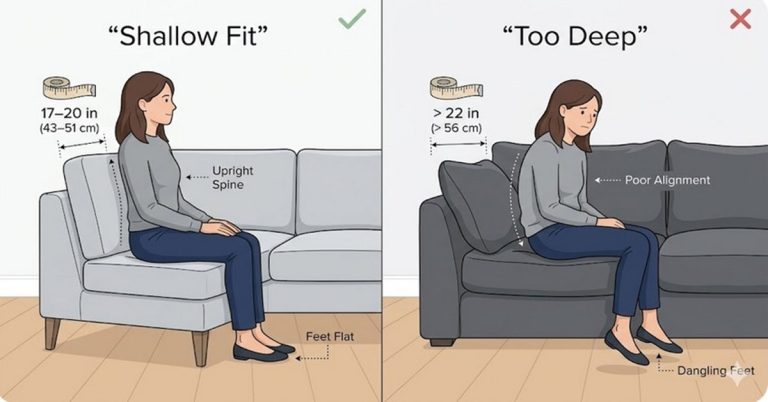
A seat that is too deep can prevent a shorter user from sitting fully back against the backrest. The result is predictable: the user moves forward, loses lumbar support, or sits in an awkward position.
A seat that is too shallow creates a different problem. Larger users may not receive enough thigh support.
Seat depth is therefore not a cosmetic dimension. It directly affects posture and pressure distribution.
Sitting hip breadth
Sitting hip breadth measures the maximum horizontal width of the hips or buttocks while seated.
This dimension matters when determining:
- Chair width
- Armrest spacing
- Sofa seating width
- Dining chair clearance
- Wheelchair and accessibility requirements
- Classroom seating dimensions
A chair can have adequate seat depth and height and still feel cramped because its usable width is insufficient.
For buyers, this is an easy detail to overlook. It should not be.
Buttock-knee length
Buttock-knee length measures the horizontal distance from the back of the buttocks to the front of the knee.
It becomes particularly relevant when furniture includes limited knee clearance.
Think about a workstation with a drawer beneath the desktop. A user may have enough space for their thighs but still hit the drawer with their knees.
The same issue appears with fixed dining tables, classroom desks, and compact office workstations.
Furniture dimensions need to account for the body occupying the space, not just the empty space visible in a product photograph.
Sitting elbow height
Sitting elbow height is important for determining arm support and working surface relationships.
It influences the positioning of:
- Armrests
- Desk surfaces
- Keyboard and mouse areas
- Writing surfaces
- Dining surfaces
- Task chairs
If a desk is too high relative to the user’s seated elbow position, the shoulders may elevate. If it is too low, the user may lean forward or lose a comfortable working posture.
This is where ergonomic design becomes more than a marketing label.
The chair, desk, armrests, and user need to work as one system.
Sitting shoulder height
Sitting shoulder height measures the vertical distance from the seat surface to the shoulder.
It is useful when designing backrests, headrests, and other forms of upper-body support.
A backrest that is too short may fail to support the intended region of the torso. A headrest positioned without considering body dimensions can also end up supporting the wrong area.
The important point is simple: backrest dimensions should be based on the body they are supporting.
Why does anthropometric percentile matter?
Furniture cannot usually be designed around every person’s exact measurements.
Instead, designers use anthropometric percentiles.
The 5th percentile represents people near the smaller end of a measured population. The 95th percentile represents people near the larger end.
But there is an important catch.
Designing everything for the 5th to 95th percentile does not automatically make furniture inclusive.
Different dimensions require different design strategies.
For example, a seat height may need to accommodate smaller users, while seat width may need to accommodate larger users. A fixed dimension that works well for one measurement can fail badly for another.
This is why adjustability is often more valuable than chasing a mythical average.
Why is adjustable furniture usually better?
Adjustable furniture can accommodate a broader population without forcing everyone into the same geometry.
An adjustable office chair can change:
- Seat height
- Seat depth
- Backrest position
- Armrest height
- Recline angle
- Lumbar support position
A height-adjustable desk can also change the relationship between the user’s seated elbow height and the work surface.
That flexibility matters in modern workplaces because one workstation may be used by people with dramatically different body dimensions.
Fixed furniture has fewer degrees of freedom.
That is not automatically bad. It simply means the dimensions have to be selected much more carefully.
How do these measurements affect an office chair?
An office chair is where sitting anthropometry becomes immediately practical.
Consider a shorter user sitting in a chair with excessive seat depth.
They cannot comfortably sit back.
Now consider a taller user sitting in a chair with insufficient seat depth.
Their thighs lack support.
Neither problem is solved by adding the word “ergonomic” to the product description.
A good chair should provide appropriate support across the dimensions that matter, ideally with enough adjustment to accommodate a meaningful range of users.
How does anthropometry affect desk and workstation design?
A desk should not be evaluated independently from the chair.
The relevant question is not simply, “How tall is this desk?”
The better question is, “How does the desk height relate to the seated user’s body dimensions and working posture?”
A workstation needs adequate:
- Leg clearance
- Knee clearance
- Thigh clearance
- Elbow and forearm positioning
- Screen positioning
- Foot support
- Seating adjustment
This is particularly important for fixed-height desks. A dimension that works for one user may force another user into an awkward posture.
Height-adjustable workstations reduce that problem considerably.
What about dining chairs and classroom furniture?
The same principles apply outside the office.
A dining chair needs an appropriate relationship between seat height, table height, thigh clearance, and elbow position.
If the table is too high, users may elevate their shoulders. If the chair is too low, the entire working relationship changes.
Classroom furniture presents an even more obvious challenge because students can have substantial differences in body size.
Using one fixed chair and desk size for an entire population may be convenient for procurement.
It is not necessarily good ergonomics.
Furniture intended for children and adolescents should account for growth and body-size variation. Adjustable or appropriately sized furniture can be a much better solution.
How should you evaluate furniture using sitting anthropometry?
You do not need to become an anthropometrist to make a better buying decision.
Start with the dimensions that affect your actual use.
For a chair, check:
- Seat height range
- Seat depth
- Usable seat width
- Armrest adjustment
- Backrest dimensions
- Lumbar support position
- Foot contact with the floor
For a desk, check:
- Work-surface height
- Legroom
- Knee clearance
- Thigh clearance
- Relationship between desk height and chair height
For a sofa, pay attention to:
- Seat depth
- Seat height
- Seat width
- Backrest height
- Cushion geometry
Do not rely exclusively on product labels such as “ergonomic,” “executive,” or “premium.”
Measure the furniture.
Then compare those measurements with the people who will actually use it.
What is the biggest mistake in furniture sizing?
The biggest mistake is designing for an average user and assuming the problem is solved.
There is no single body dimension that defines a person’s seating needs.
A person can be tall but have relatively short legs. Another can be shorter but have a longer torso. Two users with similar height can require very different seat depths.
That is why human factors and anthropometry need to work together.
Good furniture design considers the interaction between the human body, the furniture, the task, and the environment.
The practical takeaway
Sitting anthropometry turns vague claims about comfort into measurable design requirements.
The most important dimensions include popliteal height, buttock-popliteal length, sitting hip breadth, buttock-knee length, sitting elbow height, and sitting shoulder height.
These measurements influence seat height, seat depth, chair width, backrest geometry, armrest position, desk height, and clearance.
If you are buying furniture, do not ask only whether it “feels ergonomic.”
Ask whether its dimensions fit the people who will use it.
That is the real test.
Furniture should adapt to the human body as much as practical. The human body should not have to adapt to poorly sized furniture.
What Is Sitting Anthropometry?
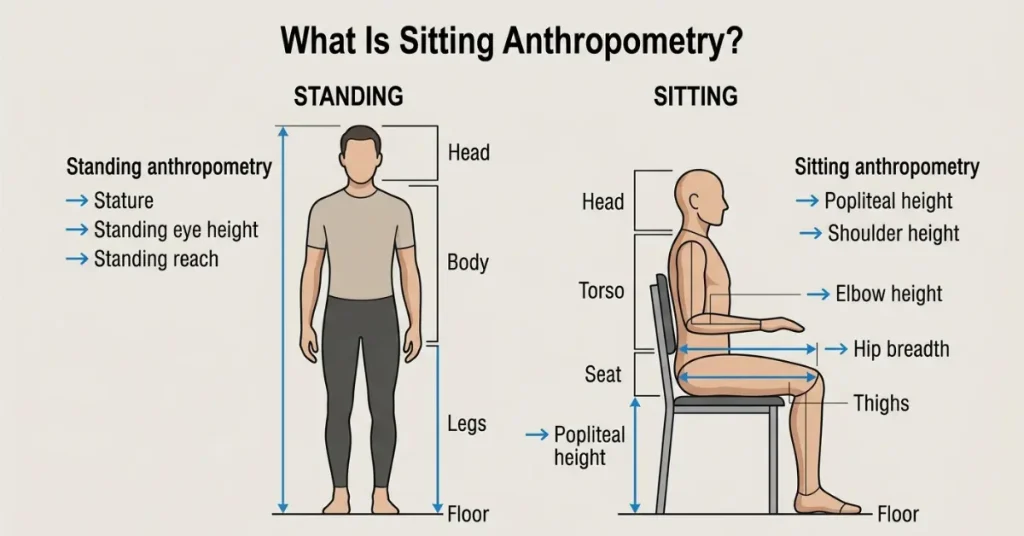
Sitting anthropometry measures body dimensions while a person is seated. Standing anthropometry measures the body in an upright standing posture.
That distinction matters.
Furniture is not designed around a person standing still. A chair, desk, vehicle seat, aircraft seat, or medical recliner interacts with the body in a seated position. The relevant dimensions therefore change.
Sitting anthropometry provides the measurements needed to understand that interaction.
Common seated measurements include popliteal height, buttock-popliteal length, sitting hip breadth, buttock-knee length, sitting elbow height, and sitting shoulder height.
These measurements help designers determine whether a product can accommodate the intended user population.
The objective is not simply comfort. It is appropriate fit, posture, clearance, support, usability, and safety.
How does sitting anthropometry differ from standing anthropometry?
Sitting anthropometry measures the human body in a seated posture. Standing anthropometry measures dimensions while the person is upright.
The measurements serve different design problems.
Standing measurements are useful for products and environments such as:
- Doorways
- Standing workstations
- Shelving
- Handrails
- Vehicle entry areas
- Protective equipment
Sitting measurements are more relevant to:
- Office chairs
- Desks
- Workstations
- Dining chairs
- Classroom furniture
- Automotive seats
- Aircraft seats
- Wheelchairs
- Healthcare seating
- Sofas and residential furniture
The mistake is treating standing height as a universal sizing variable.
It is not.
A chair designer needs to know how high the seat should be from the floor. A vehicle designer needs to understand leg clearance and seating posture. A workstation designer needs to understand the relationship between sitting elbow height and the work surface.
Those are seated-body problems.
Why can’t height alone determine furniture fit?
Stature is useful, but it is a poor substitute for detailed anthropometric data.
Two people can have the same standing height and very different body proportions.
One person may have longer legs and a shorter torso. Another may have shorter legs and a longer torso. Hip breadth, buttock-popliteal length, shoulder height, and elbow height can also vary independently.
This creates an obvious furniture problem.
Suppose two users are both 175 cm tall.
Their appropriate chair seat height does not necessarily have to be identical.
Their ideal seat depth does not necessarily have to be identical.
Their required desk clearance does not necessarily have to be identical.
Stature does not tell you enough.
For furniture fit, designers need the specific body dimensions that interact with the product.
This is where ergonomics and human factors become practical rather than theoretical.
A chair is successful when the seat, backrest, armrests, and floor relationship accommodate the user’s body. A workstation is successful when the chair and work surface create a usable relationship for the person performing the task.
Height alone cannot provide that information.
Which industries use sitting anthropometry?
Sitting anthropometry extends far beyond office furniture.
Any industry that designs products around a seated human can benefit from it.
Office furniture
Office chair and workstation manufacturers use seated body dimensions to establish seat height, seat depth, seat width, armrest position, backrest geometry, and desk relationships.
Adjustable furniture is particularly important here.
A fixed chair dimension may fit one portion of a population reasonably well. Adjustment can expand the usable range.
Automotive seating
Automotive manufacturers use anthropometric data when designing vehicle seats, driving positions, steering-wheel relationships, pedal locations, and occupant space.
The problem is more complex than making a seat comfortable.
Drivers need appropriate reach, visibility, support, clearance, and control access.
Seat dimensions interact with the entire vehicle interior.
Aircraft seating
Aircraft seating has an unusually difficult design constraint.
The designer needs to accommodate passengers while working within severe limits on space, weight, safety, and cabin capacity.
Seat pitch, seat width, cushion dimensions, legroom, and aisle clearance all interact with passenger anthropometry.
A small dimensional change can affect thousands of passengers across a fleet.
Healthcare furniture
Hospital beds, examination tables, treatment chairs, recliners, and other healthcare equipment must account for a wide range of body sizes.
Here, poor fit can become more than a comfort issue.
Transfer, positioning, accessibility, caregiver access, and patient safety can all depend on appropriate dimensions.
Healthcare design therefore places strong emphasis on human factors.
Classroom furniture
Students are not a uniform population.
Body dimensions change substantially across childhood and adolescence. A chair and desk that work for one age group may be unsuitable for another.
Classroom furniture therefore needs to consider growth, body-size variation, seat height, desk height, leg clearance, and working posture.
Adjustable or size-appropriate furniture can reduce these problems.
Workplace design
Anthropometry also affects the physical design of workplaces.
Workstations, control rooms, industrial seating, laboratory environments, and operator stations all need to accommodate the people performing the task.
The relevant question is not simply whether a worker can enter the space.
It is whether the worker can perform the task without unnecessary reach, compression, obstruction, or awkward posture.
That is a human-factors problem.
Wheelchair and mobility equipment
Wheelchairs and other mobility products require precise attention to seated body dimensions.
Seat width, seat depth, seat height, back support, arm support, and footrest relationships all influence usability.
The consequences of poor fit can be substantial because the equipment may be used for extended periods and may directly affect mobility and positioning.
Residential furniture
Residential furniture is often treated as a purely aesthetic category.
That is a mistake.
Sofas, dining chairs, recliners, beds, and home workstations still interact with human body dimensions.
A sofa with excessive seat depth may look luxurious in a showroom but feel awkward for a smaller user. A dining chair with unsuitable seat height can change the relationship between the user and the table.
Comfort is partly a dimension problem.
Product design
Industrial and consumer product designers use anthropometric data whenever a product needs to accommodate the human body.
The applications extend into seating, controls, tools, equipment, protective systems, and user interfaces.
This is why anthropometry belongs within the broader field of human-centered design.
The product should fit the intended population and task.
Not an imaginary average person.
Why does this broader view matter?
Most consumer discussions about sitting anthropometry stop at office chairs.
That is too narrow.
The same principles influence automotive interiors, aircraft cabins, healthcare equipment, classroom furniture, industrial workstations, mobility devices, and residential products.
Once the scope is understood, the purpose of sitting anthropometry becomes clearer.
It is not simply a method for choosing a comfortable chair.
It is a method for translating human body variation into measurable design requirements.
That distinction matters for anyone involved in ergonomic design, furniture design, workplace planning, product development or inclusive design.
The 6 Sitting Measurements That Matter Most for Furniture Fit
| Body measurement | Plain-English meaning | Furniture dimension it informs |
|---|---|---|
| Popliteal height | Floor to back of knee | Seat height |
| Buttock-popliteal length | Back of buttocks to back of knee | Seat depth |
| Sitting hip breadth | Maximum hip width while seated | Seat width |
| Buttock-knee length | Back of buttocks to front of knee | Leg and desk clearance |
| Sitting elbow height | Seat surface to elbow | Desk and armrest height |
| Sitting shoulder height | Seat surface to shoulder | Backrest and support geometry |
These six dimensions cover most of the basic body-to-furniture relationships in a seated environment.
They are not interchangeable.
Each measurement answers a different design question. Using the wrong measurement can produce furniture that looks correctly sized on paper but performs poorly in real use.
Which measurement is most important for chair height?
Popliteal height is the key measurement for chair seat height.
It is the vertical distance from the floor to the underside of the knee when the person is seated.
The reason is straightforward. The seat has to place the user’s feet in a workable position relative to the floor.
If the seat is too high, shorter users may struggle to maintain firm foot contact. The front edge can also place excessive pressure under the thighs.
If the seat is too low, taller users may experience excessive knee flexion and reduced support.
For this reason, chair seat height should be evaluated against the user’s popliteal height rather than their overall stature.
An adjustable office chair is usually the safer design because it can accommodate a wider range of users.
Which measurement determines seat depth?
Buttock-popliteal length is the primary measurement for determining seat depth.
It measures the horizontal distance from the back of the buttocks to the back of the knee.
Seat depth needs to provide enough thigh support without forcing the user away from the backrest.
A seat that is too deep creates a common problem for shorter users. They may slide forward because the seat extends too far behind the knees.
Once that happens, the backrest and lumbar support may no longer be positioned correctly.
A seat that is too shallow creates the opposite problem. Larger or longer-legged users may not receive adequate thigh support.
The target is not maximum depth.
The target is appropriate depth for the intended user population.
Which measurement determines seat width?
Sitting hip breadth is the primary measurement for seat width.
It represents the maximum horizontal width of the hips or buttocks while seated.
The seat needs enough usable width for the occupant to sit naturally without compression from the sides, armrests, or other components.
This becomes particularly important for:
- Office chairs
- Dining chairs
- Classroom furniture
- Automotive seats
- Aircraft seats
- Wheelchairs
- Sofas and recliners
Seat width should also account for clothing, movement, armrests, and the way the furniture is actually used.
A seat that technically matches a body measurement but leaves no practical clearance is not a well-designed seat.
Why do these six measurements work together?
Furniture fit is a system problem.
Seat height affects the relationship between the feet, knees, hips, and work surface.
Seat depth affects thigh support and the user’s ability to reach the backrest.
Seat width affects freedom of movement and lateral clearance.
Buttock-knee length affects the space required in front of the body.
Elbow height affects the relationship between the user and a desk or armrest.
Shoulder height influences how the backrest supports the upper body.
This is why a single measurement rarely tells the whole story.
Good ergonomic design considers several anthropometric dimensions at the same time.
What happens when furniture ignores these measurements?
The failures are usually predictable.
A chair can be too high. A seat can be too deep. A workstation can have insufficient knee clearance. An armrest can sit above the user’s natural elbow position.
None of these problems require a complicated explanation.
The furniture simply does not match the body.
For manufacturers, this is an anthropometry and human factors problem.
For buyers, it is a fit problem.
The practical lesson is simple: do not judge furniture by appearance or a generic “ergonomic” label. Look at the dimensions that correspond to the way your body actually interacts with the product.
Popliteal Height: The Key Measurement for Seat Height
Popliteal height is one of the most useful sitting anthropometric measurements for furniture design. It helps determine whether a chair places the user’s feet, knees, thighs, and pelvis in a workable position.
It is especially important when evaluating office chairs, dining chairs, classroom furniture, vehicle seating, and other seated environments.
What is popliteal height?
Technical definition: Popliteal height is the vertical distance from the floor or supporting surface to the underside of the knee, measured with the person sitting in a defined posture.
Plain-language definition: It is essentially the distance from the floor to the back of your knee when you are sitting.
The measurement is useful because seat height changes the entire lower-body relationship with the floor.
A correct measurement requires a controlled seated posture. The person should sit upright on a firm, level surface, with the thighs approximately horizontal and the feet resting naturally on the floor.
The knees should remain in a natural position rather than being deliberately stretched forward or pulled backward.
Measurement diagram opportunity: A simple side-view anthropometric diagram can show the seated subject, the floor reference point, the popliteal point behind the knee, and the vertical measurement line between them.
That visual would make the measurement immediately understandable.
How do you measure popliteal height?
A basic measurement procedure is straightforward, but posture matters.
- Sit on a firm, level surface.
- Keep the torso in an upright, natural position.
- Position the thighs approximately horizontal.
- Place both feet flat on the floor.
- Keep the lower legs approximately vertical without forcing the knees into a particular angle.
- Identify the popliteal point, located at the underside of the knee where the lower leg meets the thigh.
- Measure vertically from the supporting floor surface to that point.
- Record the measurement consistently, preferably using the same posture and equipment for every subject.
The measurement should not be taken while the person is slouching, stretching their legs, wearing bulky footwear, or sitting on a soft cushion that significantly changes the reference position.
For formal anthropometric studies, measurement protocols need to be standardized.
For everyday furniture evaluation, consistency is the main requirement.
How does popliteal height relate to seat height?
Popliteal height provides a reference for evaluating seat height.
The objective is not to find one universal chair-height number.
There is no single seat height that fits every adult.
The relationship depends on the user’s body dimensions, footwear, seat cushion compression, posture, task, and the surrounding furniture.
A chair seat that works for one population may be inappropriate for another.
This is why anthropometric percentiles are important in furniture design. Designers can evaluate the distribution of popliteal heights in their target population and determine whether a fixed or adjustable seat can accommodate the intended users.
Adjustability is often the practical answer.
A height-adjustable office chair can accommodate a wider range of leg dimensions than a fixed-height chair.
What happens when a seat is too high?
An excessively high seat changes more than foot contact.
It can affect the entire seated posture.
Foot support: Shorter users may be unable to place their feet firmly on the floor. The legs may end up unsupported.
Knee position: The knees can sit lower relative to the hips, changing the lower-body posture and increasing the distance between the feet and the floor.
Thigh pressure: The front edge of the seat can create pressure beneath the thighs when the user cannot achieve a comfortable foot-supported position.
Stability: Poor foot contact can reduce the user’s sense of stability and make it harder to reposition naturally.
Desk relationship: This is where the problem becomes more interesting. Lowering the chair may improve foot contact, but if the desk remains fixed, the user’s elbows may no longer align comfortably with the work surface.
That is why seat height cannot be judged in isolation.
A chair may fit the legs but fail at the workstation.
What happens when a seat is too low?
A seat that is too low creates a different set of problems.
Knee flexion: The knees may remain more deeply flexed, particularly when the feet stay flat on the floor.
Hip position: The relationship between the hips and knees changes. Depending on the task and posture, this can affect how the pelvis and trunk are positioned.
Ease of standing: A low seat can make sit-to-stand movement more demanding, particularly for some users and in situations where frequent standing is required.
Work-surface relationship: Lowering the seat also lowers the user’s elbows relative to a fixed desk or table. The user may compensate by elevating the shoulders, leaning forward, or otherwise changing posture to reach the work surface.
This is why simply saying “lower the chair if your feet do not touch the floor” is incomplete advice.
The entire furniture system has to be considered.
Why should seat height and desk height be evaluated together?
This is one of the most commonly missed points in furniture ergonomics.
A chair and desk do not operate independently.
They form a combined workstation.
Imagine a user lowers the chair to achieve better foot support. That may improve the relationship between the feet and floor.
But the desk has not moved.
The user’s elbows are now lower relative to the desktop. If the desk is too high, the user may compensate with elevated shoulders or an awkward arm position.
The reverse can also happen.
A user raises the chair to reach a fixed desk comfortably. Now the feet may lose proper floor support.
The problem is no longer simply “chair height.”
It is a mismatch between popliteal height, seat height, desk height, and working posture.
This is why adjustable furniture is so valuable in workplaces.
A well-designed workstation gives the user enough freedom to establish a workable relationship between the body and the furniture.
The real goal is not to find the perfect chair height in isolation.
It is to create a seated environment in which the feet, knees, hips, elbows, work surface, and back support work together.
Buttock-Popliteal Length: The Measurement Behind Seat Depth
Buttock-popliteal length is one of the most important measurements for determining whether a chair, sofa, or other seat has an appropriate depth.
It measures the horizontal distance from the back of the buttocks to the back of the knee while seated.
The reason it matters is simple.
Seat depth has to support the thighs without pushing the user too far away from the backrest.
What is buttock-popliteal length?
Technically, buttock-popliteal length is the horizontal distance between the rearmost point of the buttocks and the back of the lower leg at the popliteal region.
In plain language, it tells you how much front-to-back space a person’s seated body occupies from the buttocks to the knees.
It is particularly useful for designing and evaluating:
- Office chairs
- Dining chairs
- Sofas
- Recliners
- Automotive seats
- Classroom furniture
- Wheelchair seating
The measurement is not the same as standing leg length.
That distinction matters.
Furniture designers need the seated dimension because the seat itself interacts with the body in that position.
How do you measure it?
The measurement requires a stable seated posture.
A basic procedure is:
- Sit on a firm, level surface.
- Keep the back and pelvis in a natural seated position.
- Keep the thighs approximately horizontal.
- Place the feet comfortably on the floor.
- Keep the knees in a natural flexed position.
- Identify the rearmost point of the buttocks.
- Identify the back of the knee at the popliteal region.
- Measure the horizontal distance between these two reference points.
Avoid measuring while the subject is leaning forward or sliding away from the backrest.
The measurement should represent the person’s normal seated body geometry, not an artificial pose.
How does it translate into seat depth?
Buttock-popliteal length provides the primary anthropometric reference for seat depth.
But it does not mean the seat should simply be made exactly the same length.
That approach is too simplistic.
A usable seat needs to support the thighs while leaving enough space behind the knees. The design also needs to account for the backrest, seat angle, cushion compression, posture, and intended activity.
For an office chair, the relationship is especially important because the user needs to sit back against the backrest while maintaining appropriate lower-leg and foot positioning.
For a sofa, the acceptable relationship can be different because users may recline, lounge, or change posture.
The intended task matters.
Why can a deep sofa be uncomfortable for a shorter user?
A deep sofa can look generous and luxurious.
For a shorter user, it can become a posture problem.
If the seat extends too far forward relative to the user’s buttock-popliteal length, the user may not be able to sit fully back while keeping the legs in a comfortable position.
They may compensate by:
- Sliding forward
- Sitting with the pelvis unsupported
- Using cushions behind the back
- Keeping the legs extended
- Losing contact with the intended back support
The common consumer mistake is assuming that more seat depth means more comfort.
It does not.
More depth means more space. Comfort depends on whether that space matches the user’s body and the way the seat is intended to be used.
Why can a shallow seat be uncomfortable for a taller user?
The opposite problem occurs when seat depth is insufficient.
A taller user may have a longer buttock-popliteal length and therefore require more thigh support.
With a shallow seat, less of the thigh is supported.
The user may feel as though they are sitting on the front portion of the furniture rather than inside it.
This can also change how the backrest supports the body.
A good seat therefore needs to balance two competing requirements:
- Enough depth to provide useful thigh support
- Enough clearance behind the knees to allow comfortable positioning
That balance is central to ergonomic seating design.
How do cushions change effective seat depth?
Cushions complicate the measurement.
The advertised seat depth may describe the physical structure of the furniture. The effective seat depth is the usable distance available to the occupant after the back cushion, seat cushion shape, and compression are taken into account.
A thick back cushion can significantly reduce usable space.
A soft seat cushion can also change geometry when the user sits down. The body sinks into the cushion, altering the effective seating position.
This creates an important distinction for consumers.
Overall furniture depth is not the same as usable seat depth.
A sofa may have a large overall depth but provide considerably less functional sitting space.
The reverse can also occur with furniture that has a relatively compact exterior but efficient internal geometry.
Overall depth vs. usable seat depth: What should you measure?
When buying furniture, do not rely only on the product’s listed overall depth.
That number usually describes the maximum front-to-back dimension of the furniture.
It does not necessarily tell you how much space your body actually has when seated.
Instead, look for usable seat depth.
Measure from the front edge of the usable seating surface toward the back support. If the back cushion is removable, check the difference with and without the cushion if relevant to how you intend to use the furniture.
For a sofa or chair, check:
- Overall furniture depth
- Usable seat depth
- Seat height
- Back cushion thickness
- Seat cushion thickness
- Seat angle
- Distance from the seat edge to the backrest
- Whether the cushions compress significantly
This is particularly important when buying online.
Product listings often emphasize overall dimensions because they are useful for delivery planning and room layout.
They are not necessarily the dimensions that determine sitting comfort.
If you are comparing two sofas, a simple measurement such as “90 cm deep” tells you surprisingly little about how either sofa will feel.
A better question is:
How much usable seat depth remains when the furniture is configured for actual sitting?
That is the measurement that connects the product to the human body.
Buttock-popliteal length gives you the anthropometric reference.
Usable seat depth tells you whether the furniture makes practical use of it.
Sitting Hip Breadth: How Wide Should a Chair Seat Be?
Sitting hip breadth is a key anthropometric measurement for determining whether a chair provides enough usable width for the person sitting in it.
It measures the maximum horizontal breadth of the body across the hips or buttocks while seated.
But there is an important distinction.
A chair seat should not simply be made the same width as the user’s measured hip breadth. Real furniture needs additional space for movement, clothing, posture changes, armrests, and getting in and out.
The measurement is a starting point.
Not the final seat-width specification.
What is sitting hip breadth?
Sitting hip breadth is the maximum horizontal distance across the hips or buttocks when a person is seated in a defined posture.
In practical terms, it answers a simple question:
How wide is the user’s seated body at its broadest point?
The measurement is important for furniture such as:
- Office chairs
- Dining chairs
- Classroom seats
- Automotive seats
- Aircraft seats
- Wheelchairs
- Sofas
- Recliners
It is also relevant to inclusive design, where the goal is to accommodate meaningful variation in body dimensions rather than designing around an assumed average user.
How do you measure sitting hip breadth?
The measurement should be taken while the person is seated in a controlled, natural posture.
A basic procedure is:
- Sit on a firm, level surface.
- Keep the torso upright and relaxed.
- Position the thighs in a natural seated position.
- Keep the feet supported.
- Allow the hips and buttocks to settle naturally against the seat.
- Identify the widest horizontal points across the seated hips or buttocks.
- Measure the maximum horizontal distance between those points.
- Record the measurement without compressing the body.
The equipment and posture should remain consistent when measurements are being collected for a population study.
For consumers, the same principle applies in a simpler form.
Measure the body in the position in which the furniture will actually be used.
How does hip breadth relate to seat width?
Sitting hip breadth provides the basic anthropometric reference for seat width.
The seat must be wider than the body at its maximum seated breadth if the user is expected to sit naturally and move without unnecessary restriction.
But the required width depends on the design.
A simple flat chair has different requirements from a bucket-style automotive seat. A dining chair has different constraints from a wheelchair or office chair with adjustable armrests.
Seat width is therefore a functional dimension, not just a number on a product specification sheet.
The usable width needs to accommodate the user’s body while preserving enough clearance for normal use.
Why shouldn’t seat width exactly equal hip breadth?
Because people do not sit like static measurement objects.
They move.
They change posture. They wear different clothing. They enter and leave the chair. They may lean, rotate, or shift their weight.
A seat that exactly matches hip breadth can therefore feel restrictive even when the measurement appears technically correct.
Several factors increase the practical width requirement.
Movement: Users need some lateral freedom to adjust their posture and redistribute pressure.
Clothing: Heavy clothing, workwear, winter layers, and other garments can increase the space required.
Posture: The body’s effective width changes as the user changes position.
Armrests: Armrests can reduce the usable width even when the underlying seat pan is wide enough.
Side bolsters: Contoured cushions and raised side supports can consume usable seating space.
Entry and exit: A user needs enough clearance to sit down and stand up without catching against the sides of the furniture.
This is why the physical seat width and the effective seating width are not always the same thing.
A product can have a generous headline dimension and still feel narrow.
Why do armrests change the required usable seat width?
Armrests should be treated as part of the effective seat-width problem.
This is where many furniture comparisons become misleading.
Imagine a chair with a wide seat pan. On paper, it appears suitable for a broader user.
Now add fixed armrests that extend inward.
The usable width has decreased.
The user’s body does not care how wide the underlying seat structure is. It interacts with the space actually available between the limiting components.
Armrests can affect width in several ways:
- They reduce lateral clearance.
- They can restrict natural posture changes.
- They can interfere with wider hips or clothing.
- They can make entry and exit more difficult.
- They can force the user into a narrower seating position.
The same issue appears with side bolsters.
A heavily contoured chair may have a technically wide seat but a much narrower usable seating area.
For an office chair, measure the distance between the actual limiting surfaces, not just the advertised seat-pan width.
For a sofa or recliner, consider the distance between armrests and the shape of the cushions.
For automotive seating, side bolsters can substantially change the effective space available to the occupant.
The buyer-focused rule is simple:
Do not ask only how wide the seat is. Ask how much width remains usable when the person is actually sitting in it.
That distinction connects sitting hip breadth to real-world furniture fit.
It also explains why a chair that looks sufficiently wide in a product photograph can still feel cramped after ten minutes of use.
Buttock-Knee Length: The Overlooked Measurement for Desk Clearance
Buttock-knee length is one of the most overlooked measurements in furniture ergonomics.
It matters because the body does not stop at the edge of the chair.
The knees extend into the space beneath the desk or table. If that space is poorly designed, a correctly sized chair can still produce a poor workstation.
This is the key distinction:
A chair can fit the body while the complete workstation does not.
Buttock-knee length helps explain why.
What is buttock-knee length?
Buttock-knee length is the horizontal distance from the rearmost point of the buttocks to the most forward point of the knee while the person is seated.
In plain language, it represents how much front-to-back space the seated body occupies from the back of the buttocks to the front of the knee.
This measurement is especially relevant to:
- Desk design
- Table design
- Workstation planning
- Classroom furniture
- Automotive interiors
- Control stations
- Industrial workspaces
It helps designers understand how much clearance a seated user may require in front of the chair.
Why is buttock-knee length different from buttock-popliteal length?
The two measurements are related, but they answer different questions.
Buttock-popliteal length measures from the back of the buttocks to the back of the knee.
Buttock-knee length measures from the back of the buttocks to the front of the knee.
The practical difference is important.
| Measurement | Reference point | Main furniture application |
|---|---|---|
| Buttock-popliteal length | Buttocks to back of knee | Seat depth |
| Buttock-knee length | Buttocks to front of knee | Desk and leg clearance |
Think of it this way.
Buttock-popliteal length helps answer:
“How deep should the seat be?”
Buttock-knee length helps answer:
“How much space does the seated body need in front of the seat?”
Confusing the two can lead to poor furniture dimensions.
How does buttock-knee length affect desk and table design?
A desk needs more than enough surface area for a monitor and keyboard.
It needs enough space underneath for the person using it.
Buttock-knee length provides an important reference for evaluating that space.
If the underside of a desk is too shallow, the user’s knees may contact the structure before the chair reaches its intended position.
The problem can come from several sources:
- Desk depth
- Under-desk clearance
- Table supports
- Drawers
- Pedestals
- Crossbars
- Computer equipment
A desktop may appear large enough from above while the space underneath is effectively unusable.
This is particularly common with compact desks that prioritize storage or visual design over leg clearance.
Why can a chair fit correctly but still fail at a workstation?
Because furniture works as a system.
A chair can have appropriate seat height, seat depth, and seat width. The user can sit comfortably with good foot support and reasonable back support.
Then they move the chair toward the desk.
Their knees hit a drawer.
Or a pedestal blocks one leg.
Or a crossbar prevents the chair from moving far enough underneath the work surface.
The chair was not necessarily the problem.
The workstation was.
This distinction is critical in ergonomics and human factors.
How does desk depth affect leg clearance?
Desk depth is often interpreted as available workspace.
It should also be evaluated as available body space.
A deep desktop does not automatically provide deep legroom.
The underside may contain storage, structural supports, electrical components, or other obstacles.
The usable clearance should be considered separately from the overall desk dimensions.
This matters when choosing a workstation for a larger user or anyone with a longer buttock-knee length.
Why do drawers and pedestals create problems?
Storage components are common sources of hidden clearance problems.
A drawer directly beneath the work surface can reduce vertical knee clearance.
A pedestal positioned too close to the user’s sitting area can restrict leg movement.
The product may still meet its advertised dimensions.
The user simply cannot occupy the space comfortably.
This is why looking at the desk from the front and underside can be more informative than looking at the desktop dimensions alone.
How do table supports and crossbars affect clearance?
Structural components can create the same problem.
Table legs, support rails, crossbars, and central frames may occupy the exact space needed by the user’s knees or lower legs.
This is particularly relevant for conference tables, classroom desks, dining tables, and industrial workstations.
A minimalist-looking table can therefore have excellent visual clearance but poor functional clearance.
The relevant measurement is the space available where the user’s body actually goes.
What about computer equipment?
Modern workstations introduce another layer.
Computers, docking stations, power supplies, cable management systems, and other equipment can occupy space beneath or around the desk.
A workstation may technically have sufficient knee clearance before installation.
After the equipment is installed, the usable space can change.
That is why ergonomic workstation planning should evaluate the final configuration, not just the empty furniture.
What is the practical lesson for buyers?
Do not evaluate a chair and desk independently when they will be used together.
Check the complete seated envelope.
Look at:
- Seat height
- Seat depth
- Buttock-knee clearance
- Knee clearance
- Thigh clearance
- Desk underside
- Drawer position
- Pedestal location
- Crossbars and supports
- Installed computer equipment
The important question is not simply whether your chair fits.
It is whether your body, chair, and workstation fit together.
That is where buttock-knee length becomes valuable.
It connects anthropometric measurement to the part of furniture design that buyers often discover only after purchase: the space underneath the desk.
Sitting Elbow Height: The Missing Link Between Chair and Desk
Sitting elbow height is the missing link between the seated body and the work surface.
It helps explain why a chair can feel comfortable while the workstation still feels wrong.
The key relationship is vertical. The user’s elbows, armrests, desk surface, and shoulders need to work together.
A chair that fits the legs does not automatically create a good working posture.
What is sitting elbow height?
Sitting elbow height is the vertical distance from the seat surface to the underside or reference point of the elbow when the person is seated in a defined posture.
In plain language, it tells you how high the elbow sits above the chair surface.
The measurement is useful for evaluating:
- Desk height
- Armrest height
- Keyboard and mouse positioning
- Writing surfaces
- Workbench dimensions
- Control interfaces
It is particularly relevant to ergonomics, human factors, and workstation design because the elbow provides a useful reference for the position of the upper limbs during seated tasks.
How is sitting elbow height measured?
A consistent seated posture is essential.
A basic measurement procedure is:
- Sit on a firm, level surface.
- Keep the torso upright and relaxed.
- Position the upper arms naturally beside the torso.
- Bend the elbows into a comfortable working position.
- Keep the forearms in a natural position rather than deliberately raising or lowering them.
- Identify the seat surface as the lower reference point.
- Measure vertically from the seat surface to the defined elbow reference point.
- Record the measurement consistently across subjects.
The exact protocol can vary between anthropometric studies.
The important point is consistency.
Changing the arm position changes the measurement.
How does sitting elbow height affect desk height?
Sitting elbow height helps establish the relationship between the user’s body and the work surface.
A desk that is too high relative to the user’s seated elbow position can encourage shoulder elevation.
The user may feel as though the desk is forcing the arms upward.
A desk that is too low can encourage excessive forward leaning or other compensatory movements, depending on the task and chair configuration.
This is particularly important for computer work.
The keyboard and mouse are not floating independently from the desk. Their position is determined by the work surface, which is determined partly by the relationship between the chair and the user.
A good workstation therefore considers:
- Sitting elbow height
- Chair seat height
- Desk height
- Keyboard position
- Forearm support
- Monitor position
- Task requirements
The goal is not to find one perfect desk height for everyone.
The goal is to create an appropriate relationship between the seated user and the task.
How does sitting elbow height affect armrest height?
Armrests need to support the arms without forcing the shoulders into an elevated position.
Sitting elbow height provides an important reference for this.
If armrests are too high, the shoulders may remain elevated.
If they are too low, the arms may receive little useful support.
Fixed armrests are particularly restrictive because users with different sitting elbow heights have to share the same dimension.
Adjustable armrests provide more flexibility.
They allow the user to change the support position relative to their own body rather than adapting the body to a fixed component.
The width and shape of the armrest also matter.
An armrest can have an appropriate height and still interfere with natural arm movement or reduce usable seat width.
Why must chair height and desk height be evaluated together?
This is the critical point.
Sitting elbow height helps evaluate the vertical relationship between the seated user, armrests, and work surface. A mismatch can force excessive shoulder elevation or unsupported arm positioning even when the chair itself appears correctly sized.
Consider a common workstation problem.
A user raises the chair to achieve good foot support and a suitable knee position.
The desk remains fixed.
The user’s elbows are now positioned lower relative to the work surface. The shoulders may compensate.
Now reverse the situation.
The user lowers the chair to improve the relationship with the desk.
The feet may lose adequate floor support.
Neither adjustment solves the complete problem.
The chair and desk must be evaluated as a system.
This is especially important with fixed-height desks, dining tables, classroom furniture, and other products where the user has limited adjustment options.
What should buyers look for?
When evaluating a chair and desk combination, do not stop at seat height.
Check the complete vertical relationship.
Look for:
- Adjustable chair height
- Appropriate armrest adjustment
- Desk or table height
- Adequate foot support
- Comfortable elbow position
- Sufficient forearm support
- Proper keyboard and mouse positioning
The practical question is simple:
Can the user keep the feet supported while maintaining a comfortable relationship between the elbows, arms, shoulders, and work surface?
If the answer is no, changing only the chair may not solve the problem.
That is why sitting elbow height deserves more attention. It connects the lower-body fit of the chair to the upper-body demands of the workstation.
Sitting Shoulder Height and Backrest Fit
Sitting shoulder height helps designers understand how the upper body occupies a seated space.
It is relevant to backrest height, shoulder support, headrest positioning, and overall seating geometry.
But shoulder height is only one variable.
A backrest that matches a body dimension on paper can still provide poor support if the seat depth, backrest angle, lumbar position, or user’s posture is wrong.
Good seating design treats these dimensions as a system.
What is sitting shoulder height?
Sitting shoulder height is the vertical distance from the seat surface to a defined reference point on the shoulder while the person is seated in a specified posture.
In plain language, it describes how high the shoulders sit above the seat.
The measurement can help inform:
- Backrest height
- Upper-back support
- Shoulder support
- Headrest positioning
- Automotive seat geometry
- Office chair design
- Healthcare seating
The exact shoulder reference point and posture need to be standardized when collecting anthropometric data.
For furniture buyers, the broader lesson is more useful than the technical definition.
A person’s seated torso has its own dimensions. Standing height does not fully describe them.
Does backrest height determine back support?
Not by itself.
Backrest fit depends on several interacting dimensions and conditions, including:
- Backrest height
- Backrest contour
- Backrest angle
- Lumbar support location
- Seat depth
- Seat height
- User posture
- Task requirements
A tall backrest does not automatically provide better support.
A shorter backrest can work well for an active task chair if its support is positioned appropriately.
Likewise, a tall backrest can perform poorly if its lumbar contour is positioned incorrectly for the user.
The important question is not simply, “How tall is the backrest?”
It is:
Does the backrest support the right parts of the body in the posture the furniture is designed for?
An office chair used for upright computer work has different requirements from a recliner designed for relaxation.
Why can’t lumbar support be sized using height alone?
Lumbar support is often described using the user’s overall height.
That is an incomplete approach.
Two people with the same stature can have different torso lengths, pelvic dimensions, and seated proportions.
Their lumbar region may therefore occupy different positions relative to the seat.
This creates a practical problem.
If lumbar support is fixed too high, it may not contact the intended region. If it is too low, it may provide support below the area the design intended to target.
Seat depth complicates the issue further.
The user’s position relative to the backrest can change the effective location of the lumbar region.
This is why adjustable lumbar support can be useful, particularly when a chair is intended for a broad population.
How does seat depth change backrest position?
This is one of the most important relationships in seated furniture.
Seat depth and backrest position cannot be evaluated independently.
Consider a seat that is too deep for the user.
The user may move forward to avoid pressure behind the knees.
That creates distance between the user’s back and the backrest.
The lumbar support has not moved.
The user has.
The result can be reduced contact with the intended support zones.
Now consider a seat that is too shallow.
The user may remain closer to the backrest, but thigh support can become insufficient.
The posture and pressure distribution can change again.
This is why a chair’s backrest geometry cannot be judged simply by measuring its height.
The relationship between seat depth, sitting shoulder height, lumbar position, backrest contour, and posture matters.
What should buyers evaluate?
When assessing backrest fit, look beyond the headline dimensions.
Check:
- Backrest height
- Lumbar support position
- Lumbar adjustment range
- Seat depth
- Seat angle
- Backrest recline
- Shoulder and upper-back support
- Intended sitting posture
For an office chair, the goal is usually controlled support during sustained work.
For a sofa, users may recline, shift sideways, or change positions frequently.
For automotive seating, the backrest must also work with head restraint, visibility, steering, and occupant positioning.
The same anthropometric measurement can therefore produce different design requirements depending on the task.
That is the larger lesson.
Sitting shoulder height is useful, but it does not define backrest fit by itself.
Furniture works when its dimensions interact correctly with the human body, the user’s posture, and the task being performed.
The Furniture Fit Matrix: Body Measurement → Furniture Dimension → Problem
Furniture fit becomes easier to understand when each body measurement is connected to the furniture dimension it influences.
The table below provides the basic mapping.
| Body measurement | Furniture dimension | If mismatched |
|---|---|---|
| Popliteal height | Seat height | Poor foot support or excessive knee and hip positioning |
| Buttock-popliteal length | Seat depth | Pressure behind knees or inadequate thigh support |
| Sitting hip breadth | Seat width | Restricted seating space |
| Buttock-knee length | Desk and obstacle clearance | Knees or legs contact obstacles |
| Sitting elbow height | Desk and armrest height | Poor upper-limb positioning |
| Sitting shoulder height | Backrest geometry | Inadequate upper-back support |
| Thigh thickness | Vertical clearance | Restricted leg clearance |
This is the basic logic behind anthropometric furniture design.
Measure the body.
Identify the corresponding furniture dimension.
Then evaluate what happens when the two are poorly matched.
The relationship is not always one-to-one. Furniture fit is a system, and several dimensions can interact.
For example, seat height affects the user’s relationship with the desk. Seat depth affects both thigh support and backrest position. Armrest geometry can affect effective seat width.
That is why isolated measurements can be misleading.
Which anthropometric measurement maps to each furniture dimension?
Popliteal height maps primarily to seat height. It helps determine whether the user’s feet can remain appropriately supported while seated.
Buttock-popliteal length maps primarily to seat depth. It helps determine whether the seat can support the thighs without extending excessively behind the knees.
Sitting hip breadth maps primarily to seat width. It establishes the basic lateral space required for the seated body.
Buttock-knee length maps primarily to desk and obstacle clearance. It helps determine whether the knees and legs have enough front-to-back space beneath a desk or table.
Sitting elbow height maps primarily to desk and armrest height. It helps establish the vertical relationship between the upper limbs and supporting surfaces.
Sitting shoulder height maps primarily to backrest geometry. It helps designers position upper-back and shoulder support appropriately.
Thigh thickness maps primarily to vertical clearance. It is important when determining whether the space between the seat and an obstruction, such as a desk underside, provides enough room for the thighs.
The mapping can be summarized simply:
- Seat height: Popliteal height
- Seat depth: Buttock-popliteal length
- Seat width: Sitting hip breadth
- Leg and knee clearance: Buttock-knee length
- Desk and armrest height: Sitting elbow height
- Backrest geometry: Sitting shoulder height
- Vertical thigh clearance: Thigh thickness
This mapping is useful for both designers and buyers.
If a chair feels wrong, identify the furniture dimension causing the problem. Then identify the body measurement that dimension needs to accommodate.
That approach is more useful than relying on vague claims such as “ergonomic” or “comfortable.”
Why is the furniture fit matrix useful?
The matrix turns anthropometry into a practical decision tool.
For manufacturers, it helps connect human dimensions to product specifications.
For workplace designers, it helps evaluate the interaction between chairs, desks, and users.
For consumers, it provides a faster way to interpret furniture dimensions before buying.
The central principle is simple:
Furniture should be sized around the dimensions that actually interact with the human body.
A single average measurement cannot solve every fit problem.
Good ergonomic design accounts for body variation, task requirements, posture, clearance, and adjustability.
That is what turns anthropometric data into usable furniture.
Why Furniture Fit Is a System, Not a Single Dimension
Furniture fit is not a one-number problem.
A chair can have an appropriate seat height and still be uncomfortable. A desk can have a reasonable height and still create poor working posture. An armrest can be correctly positioned relative to the elbow while making the seat feel too narrow.
The reason is simple.
The human body interacts with furniture as a system.
Anthropometric dimensions do not operate independently. Changing one furniture dimension can alter several other body-to-furniture relationships.
This is where basic furniture sizing ends and serious ergonomics and human factors begin.
Why can a chair have the correct seat height but still be uncomfortable?
Seat height is important, but it is only one part of chair fit.
A chair can match a user’s popliteal height reasonably well and still fail because the seat is too deep, too narrow, poorly cushioned, or badly shaped.
The backrest may also be in the wrong position.
Consider a user whose feet sit comfortably on the floor. That suggests the seat height is working.
But if the seat depth is excessive, the user may still struggle to reach the backrest without pressure behind the knees.
The chair passes one measurement.
It fails another.
This is why checking a single specification can create false confidence.
Why do seat depth and seat height interact?
Seat height and seat depth influence different body dimensions, but they also interact.
Changing seat height changes the position of the knees, hips, and feet relative to the floor.
Changing seat depth changes how far the body extends toward the front of the seat and how the user contacts the backrest.
Together, they influence the user’s overall sitting position.
For example, raising a chair may improve desk alignment for one user.
But if that user already has limited foot support, the higher position can create another problem.
Likewise, reducing seat depth may improve backrest contact while changing the amount of thigh support.
There is no isolated “correct” dimension.
There is a workable combination.
Why must chair, desk, armrest, and monitor dimensions be considered together?
A workstation is a connected physical system.
The chair establishes the user’s seated position.
The desk determines the height and location of the work surface.
The armrests influence forearm and shoulder positioning.
The monitor determines where the user looks and how the head and neck are positioned.
Change one component and the relationship with the others can change.
A chair that allows good foot support may place the user too low relative to a fixed desk.
Raising the chair can improve the desk relationship but reduce foot support.
Adding high armrests can alter shoulder position.
Moving the monitor without considering the user’s seated posture can create a new viewing problem.
This is why ergonomic workstation design should evaluate the complete arrangement rather than treating each product as an independent object.
What is the chain reaction of a furniture mismatch?
Small dimensional errors can propagate through the entire furniture system.
Consider this sequence:
Seat too high → feet lose support → sitting position changes → desk relationship changes → arm position changes.
The chain can continue.
Arm position changes → shoulder posture changes → monitor relationship changes → head and neck position changes.
The original problem was the seat height.
The final complaint might be about shoulder or neck comfort.
This is why diagnosing furniture problems by looking only at the location of discomfort can be misleading.
The visible symptom may occur several steps away from the original mismatch.
How does seat depth create a similar chain reaction?
Consider an excessively deep seat.
Seat too deep → user moves forward → backrest contact decreases → lumbar support becomes less effective → working posture changes.
The user may then lean forward toward the desk.
The desk has not changed.
The chair has not necessarily changed.
But the user’s relationship with both has.
This is the systems perspective that simple furniture dimension guides often miss.
Why does adjustability matter?
Adjustability increases the number of body sizes a furniture system can accommodate.
An adjustable office chair can modify seat height, seat depth, armrest position, backrest position, or lumbar support.
A height-adjustable desk can change the relationship between the work surface and the seated user’s elbows.
These adjustments are not merely convenience features.
They are mechanisms for managing human variation.
A fixed product has to make more assumptions about its users.
An adjustable product can make fewer.
What should buyers evaluate as a complete system?
Instead of asking whether a chair is ergonomic, evaluate the complete setup.
Check:
- Seat height relative to popliteal height
- Seat depth relative to buttock-popliteal length
- Seat width relative to sitting hip breadth
- Under-desk space relative to buttock-knee length and thigh clearance
- Desk height relative to sitting elbow height
- Armrest position relative to the user’s arms
- Backrest geometry relative to seated torso dimensions
- Monitor position relative to the resulting sitting posture
The objective is not to make every dimension perfect independently.
The objective is to make the dimensions work together.
That is the central principle of anthropometric furniture fit.
A well-designed workstation is not a collection of correctly sized parts. It is a coordinated system built around the human body.
How to Measure Yourself for Furniture Fit at Home
You do not need a laboratory to collect useful measurements for furniture shopping.
A measuring tape, a firm chair, and a flat floor are enough for a practical home assessment.
The goal is not to reproduce a formal anthropometric study.
The goal is to get consistent measurements that help you compare your body with the dimensions of a chair, desk, sofa, or other furniture.
What equipment do you need?
Keep the setup simple.
- Measuring tape: A flexible tape works well for body dimensions.
- Firm chair: Choose a chair with a reasonably firm, level seat. Avoid thick cushions.
- Flat floor: Your feet need a stable reference surface.
- Helper: Useful for taking horizontal and vertical measurements accurately.
- Paper or phone: Record each measurement immediately so you do not rely on memory.
Wear normal, lightweight clothing.
Remove bulky shoes when measuring dimensions that depend on floor contact.
Most importantly, use the same posture each time.
A small change in posture can change the result.
How do you measure popliteal height?
Popliteal height is the measurement from the floor to the back of the knee while seated.
It is the main body dimension used to evaluate seat height.
Follow these steps:
- Sit upright on the firm chair.
- Place both feet flat on the floor.
- Keep your thighs approximately horizontal.
- Let your lower legs rest naturally rather than deliberately stretching or pulling them backward.
- Keep your torso relaxed and avoid slouching.
- Have your helper identify the point directly behind the knee.
- Measure vertically from the floor to that point.
- Keep the measuring tape as close to vertical as possible.
- Record the result.
Do not measure from the top of the chair seat.
The reference is the floor to the popliteal point.
If you are comparing this measurement with a furniture specification, also consider footwear and seat-cushion compression.
A soft cushion can reduce the effective seat height after you sit down.
How do you measure buttock-popliteal length?
Buttock-popliteal length helps evaluate seat depth.
It measures the horizontal distance from the back of the buttocks to the back of the knee.
Use this procedure:
- Sit on the same firm chair.
- Position your back and pelvis naturally.
- Keep both feet supported on the floor.
- Keep your thighs approximately horizontal.
- Sit in a normal upright position rather than leaning forward.
- Have your helper identify the rearmost point of your buttocks.
- Identify the point at the back of the knee.
- Measure the horizontal distance between the two points.
- Record the result.
Keep the measuring tape horizontal.
Do not follow the curve of your thigh.
That would produce a different measurement.
When shopping for a chair or sofa, compare this body dimension with the usable seat depth, not simply the furniture’s overall front-to-back depth.
That distinction matters.
How do you measure sitting hip breadth?
Sitting hip breadth helps evaluate seat width.
It represents the maximum horizontal width of the hips or buttocks while seated.
Follow these steps:
- Sit upright on the firm chair.
- Keep your feet supported on the floor.
- Position your thighs naturally.
- Relax your hips and avoid deliberately squeezing your legs together.
- Have your helper identify the widest points across your seated hips or buttocks.
- Measure horizontally from one side to the other.
- Keep the tape level with the floor.
- Do not compress the body with the tape.
- Record the widest measurement.
Do not pull the tape tightly.
You are measuring the body, not trying to find the smallest possible number.
When comparing the result with a chair specification, remember that usable seat width can be smaller than the physical seat width.
Armrests, side bolsters, cushion shape, and other components can consume seating space.
How do you measure buttock-knee length?
Buttock-knee length measures the horizontal distance from the back of the buttocks to the front of the knee.
It is particularly useful for evaluating desk depth, knee clearance, and obstacles beneath tables.
Follow these steps:
- Sit upright on a firm chair.
- Keep your back and pelvis in a natural seated position.
- Place both feet flat on the floor.
- Keep your thighs in a comfortable, approximately horizontal position.
- Do not lean forward or deliberately extend your knees.
- Have your helper identify the rearmost point of your buttocks.
- Identify the most forward point of the knee.
- Measure horizontally between these two points.
- Keep the tape level with the floor.
- Record the measurement.
Do not confuse this with buttock-popliteal length.
Buttock-popliteal length ends at the back of the knee and is mainly relevant to seat depth.
Buttock-knee length extends to the front of the knee and is more useful for evaluating the space required in front of the body.
How do you measure sitting elbow height?
Sitting elbow height measures the vertical distance from the seat surface to the elbow in a defined seated posture.
It helps evaluate desk height, armrest height, and upper-limb positioning.
Follow these steps:
- Sit on a firm, level chair.
- Keep your torso upright and relaxed.
- Place your feet flat on the floor.
- Let your upper arms rest naturally beside your torso.
- Bend your elbows into a comfortable working position.
- Keep the forearms in a natural position.
- Have your helper identify the appropriate elbow reference point.
- Measure vertically from the seat surface to that point.
- Keep the tape perpendicular to the seat.
- Record the measurement.
Do not raise your shoulders to reach the measuring point.
Likewise, do not deliberately lower the elbows.
The measurement should represent your natural seated working posture.
For workstation planning, this measurement becomes more useful when considered together with chair height and desk height.
How should you record your measurements?
Record all measurements in the same unit.
Centimeters are usually convenient for furniture comparisons.
Do not round aggressively. A measurement such as 44.7 cm is more useful than simply writing 45 cm when you are comparing products with small dimensional differences.
Use this template:
| Measurement | Your result |
|---|---|
| Popliteal height | ___ cm |
| Buttock-popliteal length | ___ cm |
| Sitting hip breadth | ___ cm |
| Buttock-knee length | ___ cm |
| Sitting elbow height | ___ cm |
| Sitting shoulder height | ___ cm |
Keep the completed table when shopping for furniture.
It becomes a useful personal reference.
For each product, compare your measurements with the relevant furniture dimensions. Do not expect a one-to-one numerical match. Furniture dimensions also depend on cushion compression, posture, clearance requirements, adjustment ranges, and the intended task.
The objective is not to find furniture that matches every measurement exactly.
The objective is to identify obvious mismatches before they become an expensive comfort problem.
How to Measure Furniture Correctly Before Buying
Furniture measurements often look precise.
That does not mean they tell you what you need to know.
A product listing may give the overall height, width, and depth of a chair or sofa. Those numbers are useful for checking whether the furniture will fit in your room.
They are not always useful for checking whether your body will fit the furniture.
For that, measure the functional dimensions.
Which chair dimensions should you record?
When evaluating a chair, focus on the dimensions that directly interact with your body.
Record:
- Usable seat height: Measure from the floor to the actual seating surface. For a soft seat, measure under realistic sitting compression.
- Usable seat depth: Measure from the front edge of the usable seating area to the point where the user’s back will actually contact the backrest.
- Usable seat width: Measure the available width between the actual limiting surfaces, including armrests or side bolsters.
- Armrest height: Measure from the compressed seat surface to the arm support surface.
- Backrest height: Record the height of the backrest from its functional starting point, not simply the tallest point of the frame.
- Backrest angle: Check the angle of the support surface relative to the seat or vertical reference.
These measurements give you a much better picture of chair fit than overall width and height alone.
For an office chair, adjustment range also matters.
A chair with a suitable maximum seat height but an unsuitable minimum height may still fail a shorter user.
Which sofa measurements actually matter?
Sofa shopping creates an even bigger measurement problem.
Manufacturers often emphasize overall depth because it helps buyers determine whether the sofa will fit through a doorway or within a room.
For sitting comfort, other dimensions are more important.
Check:
- Compressed seat height: Measure the seat height with the cushion compressed by normal body weight.
- Usable seat depth: Measure the actual sitting surface available from the front edge to the back support.
- Cushion thickness: Record the cushion thickness and consider how much it compresses during use.
- Back cushion intrusion: Determine how far the back cushion extends into the seat area.
A sofa with a 60 cm overall seat area may not provide 60 cm of usable sitting depth.
A thick back cushion can consume part of that space.
A soft seat cushion can also change the effective height and posture once someone sits down.
This is why showroom measurements taken without a person sitting on the furniture can be misleading.
Why can manufacturer dimensions be misleading?
The problem is usually not that the dimensions are incorrect.
The problem is that they measure the product, while you need to understand the function.
There is a difference between:
Overall dimensions
and
Functional dimensions.
Overall dimensions describe the physical envelope of the furniture.
They commonly include:
- Maximum height
- Maximum width
- Overall depth
- Frame dimensions
- External armrests
- Structural components
Functional dimensions describe the space available to the user.
These include:
- Usable seat height
- Usable seat depth
- Usable seat width
- Leg clearance
- Arm support position
- Back support position
Consider a sofa advertised as 100 cm deep.
That does not tell you whether the usable seat depth is 55 cm, 65 cm, or something else.
The same issue occurs with chairs.
A 50 cm wide chair may have a much smaller usable seat width once armrests and side bolsters are considered.
For buyers, the distinction is critical.
Overall dimensions tell you whether the furniture fits the room. Functional dimensions tell you whether it fits the person.
You need both.
How should you measure a cushion seat?
Measure the cushion in the condition in which the furniture will actually be used.
An empty cushion and a loaded cushion are not geometrically identical.
When someone sits down, the cushion compresses. The body sinks. The effective seat height can decrease, while the usable seating geometry can change.
For a practical measurement:
- Place the furniture on a level floor.
- Measure the uncompressed seat height and depth.
- Sit in the normal position you would use at home.
- Allow the cushion to settle naturally.
- Have a helper repeat the relevant measurements while you remain seated.
- Record the compressed seat height.
- Check the usable seat depth from your actual sitting position.
- Check whether the back cushion moves or compresses.
- Note any change in seat angle or body position.
Do not deliberately squash the cushion with your hands and treat that as the final measurement.
The useful measurement is the geometry created by normal occupant loading.
This is especially important with sofas, recliners, lounge chairs, and other heavily cushioned furniture.
A product can have impressive specifications while producing a completely different sitting experience after ten minutes of real use.
That is why furniture measurement should follow the same principle as anthropometric measurement:
Measure the condition that actually matters.
If you are checking whether furniture fits your body, measure the usable dimensions under realistic sitting conditions, not just the largest numbers in the product listing.
The Furniture Fit Scorecard
Furniture shopping usually starts with appearance, price, and room dimensions.
That is backwards if fit matters.
A better approach is to compare the human body with the functional dimensions of the furniture.
The Furniture Fit Scorecard provides a simple six-step framework for doing that.
It does not produce a universal ergonomic score.
Human comfort depends on body dimensions, posture, task, duration of use, furniture adjustment, and individual needs. A numerical score cannot capture all of those variables.
Use the scorecard as a screening tool.
Step 1: How do you measure your body?
Start with the dimensions that correspond to the furniture you are evaluating.
For seated furniture, record:
- Popliteal height
- Buttock-popliteal length
- Sitting hip breadth
- Buttock-knee length
- Sitting elbow height
- Sitting shoulder height
Keep the measurements consistent.
Use the same units throughout.
If possible, have another person take the measurements. This reduces errors caused by reaching, twisting, or changing posture while measuring yourself.
Step 2: How do you measure the furniture?
Now measure the furniture in its usable condition.
For a chair, record:
- Usable seat height
- Usable seat depth
- Usable seat width
- Armrest height
- Backrest height
- Backrest angle
For a desk or table, check:
- Work-surface height
- Under-desk height
- Legroom depth
- Drawer clearance
- Pedestal position
- Crossbars and supports
For a sofa, pay particular attention to:
- Compressed seat height
- Usable seat depth
- Usable seat width
- Cushion thickness
- Back cushion intrusion
Do not rely exclusively on manufacturer specifications.
Overall dimensions and functional dimensions are different things.
Step 3: How do you match corresponding dimensions?
Connect each body measurement with the furniture dimension it influences.
The basic mapping is:
- Popliteal height → seat height
- Buttock-popliteal length → seat depth
- Sitting hip breadth → seat width
- Buttock-knee length → desk and obstacle clearance
- Sitting elbow height → desk and armrest height
- Sitting shoulder height → backrest geometry
- Thigh thickness → vertical clearance
Do not expect the numbers to match exactly.
The body measurement is an anthropometric reference.
The furniture dimension must also account for movement, posture, clothing, cushion compression, clearance, and the intended task.
Step 4: How do you identify critical mismatches?
Not every dimensional difference has the same importance.
Some mismatches are easy to tolerate.
Others can make the furniture effectively unusable.
Pay particular attention to:
- Feet that cannot remain properly supported
- Seat edges that press behind the knees
- Insufficient seat width
- Knees contacting the desk or furniture structure
- Thighs contacting the underside of a desk
- Shoulders being forced upward
- Armrests interfering with the seating position
- Lumbar support sitting in the wrong location
- A backrest that cannot support the intended posture
These are critical because they can trigger compensatory behavior.
The user changes position to accommodate the furniture.
That can create another mismatch somewhere else.
Step 5: How do you check adjustability?
Adjustability can turn a marginal fit into a workable one.
Check whether the furniture allows you to change the dimensions that matter.
For an office chair, look for:
- Seat-height adjustment
- Seat-depth adjustment
- Armrest adjustment
- Backrest adjustment
- Lumbar adjustment
For a workstation, check whether the desk height can be adjusted.
For a sofa, adjustment may be limited, so the initial dimensional fit becomes more important.
A wide adjustment range is useful only if it actually covers the user’s required position.
A product advertised as “fully adjustable” is not automatically suitable.
Check the actual range.
Step 6: How do you test the actual sitting posture?
Measurements narrow the options.
They do not replace sitting in the furniture.
Test the furniture in the posture and task for which you will use it.
For an office chair, sit as you would during computer work.
For a dining chair, sit at the actual table.
For a sofa, sit in your normal relaxed position rather than briefly perching on the edge.
Check:
- Are your feet supported?
- Do your knees have adequate clearance?
- Does the seat pressure the back of your knees?
- Can you reach the backrest naturally?
- Are your elbows positioned comfortably?
- Do the armrests restrict movement?
- Does the backrest support the intended areas?
- Can you change posture without fighting the furniture?
Duration matters too.
A chair that feels acceptable for two minutes may reveal its problems after an hour.
How should you use the Green, Yellow, and Red system?
Use a simple traffic-light classification.
Green: likely compatible
The key dimensions appear appropriate, there are no obvious clearance problems, and the furniture supports a natural sitting posture.
Yellow: investigate or test
One or more dimensions are uncertain, close to a practical limit, or dependent on adjustment. Test the furniture before committing to it.
Red: significant mismatch
A critical dimension clearly conflicts with your body or task. Examples include inadequate seat depth, insufficient width, poor foot support, or knees contacting the desk.
Do not treat these colors as a scientific ergonomic rating.
They are decision aids.
A person with a particular physical limitation, injury, mobility requirement, or specialized task may need a much more detailed assessment.
What is the final Furniture Fit Scorecard rule?
The framework can be reduced to one sequence:
Measure the body → measure the furniture → match the dimensions → identify critical mismatches → check adjustment → test the actual posture.
If the result is Green, the furniture is a reasonable candidate.
If it is Yellow, investigate before buying.
If it is Red, do not assume that an attractive design or an “ergonomic” label will compensate for the mismatch.
The point of the scorecard is not to turn ergonomics into a game of numbers.
It is to make furniture fit visible before you spend money.
That is the real advantage of anthropometric thinking.
How Anthropometric Percentiles Are Used in Furniture Design
Anthropometric percentiles help furniture designers account for variation between people.
The mistake is treating the percentile as a ranking of “small,” “average,” and “large” people.
It is more useful to think of a percentile as a position within the distribution of a specific body measurement.
A person’s 5th percentile popliteal height, for example, does not mean that person is at the 5th percentile for every other body dimension.
Different measurements have different distributions.
That distinction matters when designing chairs, desks, workstations, vehicle seats, and other products.
What does the 5th percentile mean?
The 5th percentile represents a value below which approximately 5% of the reference population falls for a particular measurement.
For a furniture designer, this can represent the smaller end of the target population for that specific dimension.
For example, a low popliteal height at the 5th percentile can be relevant when considering whether a fixed seat is too high for smaller users.
The practical question is:
Who needs to be accommodated at the smaller end of this dimension?
That answer depends on the furniture dimension being designed.
What does the 50th percentile mean?
The 50th percentile is the median.
Approximately half of the reference population has a measurement below it and half has a measurement above it.
It is often casually described as the “average person.”
That description is misleading.
The 50th percentile for sitting hip breadth is not necessarily representative of the 50th percentile for sitting elbow height, popliteal height, or buttock-popliteal length.
There is no single anthropometric “average person” whose body matches every median measurement.
This is one reason designing an entire chair around 50th percentile values can fail.
What does the 95th percentile mean?
The 95th percentile represents a value below which approximately 95% of the reference population falls.
Only about 5% of the population has a higher value for that particular measurement.
This can be useful when a furniture dimension needs to accommodate users toward the larger end of a body dimension.
For example, a designer considering seat width may examine higher-percentile sitting hip breadth.
For clearance problems, larger body dimensions are often particularly important.
If the goal is to provide enough space, designing only around a median user can leave larger users with inadequate clearance.
Why can “designing for the average person” fail?
Because the average person does not exist as a complete anthropometric template.
A user can be near the median for stature but above the median for sitting hip breadth.
Another user can have average stature but relatively long legs.
Another can have a shorter torso and different sitting shoulder height.
Furniture has to accommodate these combinations.
This is especially important because different design dimensions have different consequences.
For seat height, smaller users may be critical because a seat that is too high can compromise foot support.
For seat width, larger hip breadth may be critical.
For desk clearance, larger buttock-knee length and thigh dimensions may be critical.
The correct percentile strategy therefore depends on the specific design problem.
Which percentile should be used for seat dimensions?
There is no universal percentile that should be applied to every seat dimension.
The appropriate strategy depends on:
- The specific furniture dimension
- The target population
- The task
- The consequences of poor fit
- Whether the furniture is adjustable
- Whether the design needs to accommodate a broad population
- Relevant ergonomic and safety requirements
Different dimensions may require different design approaches.
For example, a seat-height design may need to accommodate users toward the lower end of popliteal height.
Seat width may need to account for users toward the higher end of sitting hip breadth.
Clearance dimensions often need to accommodate larger body dimensions because insufficient space cannot be solved by asking the user to become smaller.
This is known as designing around the critical user dimension.
The important question is not:
“Which percentile should furniture use?”
It is:
“Which part of the population is most critical for this specific dimension and task?”
Why can adjustable furniture outperform a one-size-fits-all design?
Adjustability reduces the amount of compromise built into a fixed dimension.
Consider seat height.
A fixed chair has one primary seat-height position. That position has to serve a range of popliteal heights.
An adjustable chair can cover a much broader range.
The same principle applies to:
- Seat depth
- Armrest height
- Lumbar support
- Backrest position
- Desk height
- Monitor position
This makes adjustable furniture particularly valuable in workplaces where users vary substantially in body size.
But adjustability is not automatically a solution.
The adjustment range has to be large enough.
The controls need to be usable.
The furniture must remain stable throughout the adjustment range.
And users need to know how to configure it.
The strongest ergonomic design often combines appropriate anthropometric percentiles with useful adjustment.
That is more robust than trying to build one supposedly perfect dimension for everyone.
Adjustable vs. Fixed Furniture: Which Is Better?
There is no universal winner.
Fixed furniture can work extremely well when the target users are relatively consistent and the dimensions are appropriate.
Adjustable furniture becomes more valuable as variation increases.
Different users have different popliteal heights, leg lengths, hip breadths, torso dimensions, and elbow heights. A single fixed geometry has to compromise somewhere.
The commercial question is therefore not simply, “Is adjustable better?”
It is:
How much human variation does the furniture need to accommodate?
When should you prioritize adjustable seat height?
Adjustable seat height is one of the most valuable features in a chair.
It allows the user to change the relationship between the seat, feet, knees, hips, and work surface.
Prioritize it when:
- Multiple people will use the chair.
- Users have substantially different body sizes.
- The chair is used with a fixed-height desk.
- Foot support is important.
- The chair is used for prolonged work.
- The furniture must serve a broad population.
A fixed seat height can work for a carefully defined user group.
But once the population becomes more diverse, adjustment becomes a practical way to manage anthropometric variation.
When is adjustable seat depth valuable?
Seat depth is often overlooked.
It should not be.
A seat that is too deep for a user can interfere with backrest contact and create pressure behind the knees.
A seat that is too shallow may provide insufficient thigh support.
Adjustable seat depth is particularly useful when:
- Users have different leg lengths.
- The chair will be shared.
- Long periods of sitting are expected.
- The backrest and lumbar support need to accommodate different users.
- The target population covers a wide anthropometric range.
Seat-depth adjustment is especially valuable because it changes more than one relationship.
It affects thigh support, knee clearance, pelvic position, and distance from the backrest.
When do adjustable armrests matter?
Armrests are not decorative accessories.
Their position affects the relationship between the arms, shoulders, desk, and seat.
Adjustable armrests can be useful when users have different sitting elbow heights or when the chair must support different tasks.
Useful adjustments may include:
- Height
- Width
- Forward and backward position
- Pivot or angle
Armrest width also matters.
An armrest that sits too far inward can reduce effective seat width.
An armrest that sits too far outward may provide poor support.
For workstation seating, adjustment allows the user to find a more appropriate position without forcing the entire chair geometry to change.
When is a fixed chair acceptable?
Fixed furniture is not automatically inferior.
It can be the better choice when the user population is narrow and predictable.
A fixed chair may work well for:
- A dedicated dining area
- A carefully specified classroom
- A single-user application
- Furniture designed around a known population
- Situations where simplicity and durability are priorities
The key is matching the fixed dimensions to the intended users.
A fixed chair designed for a specific population can be more appropriate than a poorly engineered adjustable chair with limited or awkward adjustment ranges.
Adjustment adds complexity.
It should solve a real variation problem.
Why do shared workstations need a different design strategy?
Shared workstations expose the weakness of fixed dimensions.
One desk may serve users with substantially different:
- Popliteal heights
- Buttock-popliteal lengths
- Sitting hip breadths
- Sitting elbow heights
- Sitting shoulder heights
- Buttock-knee lengths
A single chair position cannot optimize all of these users.
The design strategy therefore shifts from fit one user to accommodate a population.
This is where anthropometry and adjustability connect directly.
A shared workstation should provide enough adjustment to accommodate the relevant range of users while preserving adequate clearance and stable support.
A height-adjustable desk can further improve the system by allowing the work surface to move with the user.
Without that flexibility, users may compensate through chair height, posture, foot position, or arm position.
The result is often a chain of compromises.
Which is better for buyers?
Use a simple rule.
Choose fixed furniture when the user population is predictable and the dimensions fit that population.
Choose adjustable furniture when the user population is varied or the furniture must support different tasks and body sizes.
For an individual buyer, adjustability is most valuable where your body dimension and the furniture dimension are difficult to match with a fixed product.
For a shared workplace, adjustability becomes much more important.
The more diverse the population, the less sensible it is to rely on one fixed geometry.
That is the commercial value of anthropometry.
It tells you where a product needs flexibility, and where a fixed dimension may be perfectly adequate.
Sitting Anthropometry for Different Furniture Types
Sitting anthropometry becomes useful when body measurements are translated into the geometry of a specific furniture system.
A chair, desk, and dining table do not solve the same ergonomic problem.
The relevant measurements change with the task, posture, and interaction between the user and the furniture.
What sitting anthropometry tells us about office chairs
An office chair has to support the body while allowing sustained work.
The important dimensions are:
- Seat height: Closely related to popliteal height and foot support.
- Seat depth: Related to buttock-popliteal length and thigh support.
- Seat width: Related to sitting hip breadth, clothing, movement, and armrest placement.
- Armrest height: Related to sitting elbow height and upper-limb support.
- Backrest: Must work with sitting shoulder height, torso proportions, posture, and seat depth.
- Lumbar support: Must be positioned relative to the user’s seated body, not simply overall stature.
A good office chair therefore needs more than a comfortable cushion.
It needs coordinated geometry.
An adjustable chair can accommodate a wider anthropometric range because seat height, seat depth, armrests, and lumbar support can be adapted to the individual.
What sitting anthropometry tells us about office desks and workstations
A workstation is not just a large horizontal surface.
The user needs space to occupy the area beneath it.
Important dimensions include:
- Desk height: Must work with sitting elbow height and the selected chair height.
- Knee clearance: Must accommodate the seated user’s forward leg position.
- Thigh clearance: Must provide enough vertical space beneath the work surface.
- Desk depth: Must provide both usable workspace and sufficient body clearance.
- Chair compatibility: The chair and desk must work together rather than being evaluated separately.
This is where buttock-knee length becomes particularly useful.
A desk can have a generous desktop and still provide poor legroom.
Drawers, pedestals, support frames, crossbars, and computer equipment can reduce usable clearance.
The practical test is not whether the desk has enough surface area.
It is whether the user can move the chair into an effective working position without the knees, thighs, or legs contacting the structure.
What sitting anthropometry tells us about dining chairs and tables
Dining furniture introduces a different task.
Users typically sit for meals, conversation, reading, or occasional work. The chair and table therefore need to function as a pair.
The important dimensions include:
- Seat height: Influences foot support and the user’s vertical relationship with the table.
- Table height: Determines the position of the arms and hands during eating or other tasks.
- Thigh clearance: Determines whether the user can sit close enough to the table without the thighs contacting its underside.
- Elbow and arm position: Affects comfort when eating, writing, using devices, or resting the arms.
The interaction between chair and table is critical.
A dining chair can have an acceptable seat height by itself.
The combination can still fail if the table is too low or too high.
A thick tabletop, apron, drawer, or structural support can further reduce thigh clearance.
This is why dining furniture should be evaluated as a seated system, not as isolated products.
Why does furniture type change the anthropometric priorities?
The same human body interacts differently with different furniture.
An office chair prioritizes sustained support and workstation alignment.
A desk prioritizes work-surface height and clearance.
Dining furniture prioritizes the relationship between the seated body and the table.
The measurement does not change simply because the product changes.
The design implication changes.
That distinction is central to ergonomic design.
Anthropometry provides the body dimensions. Furniture design determines how those dimensions are accommodated in the actual task environment.
How does sitting anthropometry apply to sofas and lounge chairs?
Sofas and lounge chairs create a different seating problem from office chairs.
The user may recline, shift position, stretch the legs, or sit at an angle. Comfort therefore depends heavily on the interaction between the seat and backrest.
Key dimensions include:
- Usable seat depth: Determines how much of the seat can actually support the user before the backrest is reached.
- Compressed seat height: Shows where the user’s body actually sits after the cushion is loaded.
- Backrest angle: Influences the relationship between the pelvis, torso, and head.
- Cushion geometry: Includes cushion thickness, contour, firmness, and the amount of usable space lost to the back cushion.
A sofa’s overall depth can be impressive and still produce a poor sitting experience.
A thick back cushion can consume usable seat depth.
A soft cushion can also lower the user’s seated position substantially.
This is why lounge furniture should be evaluated in its loaded, usable condition, not only by its external dimensions.
How does sitting anthropometry apply to classroom furniture?
Classroom furniture has a difficult design requirement.
One product may need to accommodate students with substantially different body sizes while supporting writing, reading, listening, and device use.
The key dimensions are:
- Seat height: Must provide an appropriate relationship between the user’s legs and the floor.
- Seat depth: Must provide useful thigh support without forcing the seat too far behind the knees.
- Desk height: Must work with the student’s seated elbow position and chair height.
- Leg clearance: Must provide enough space for knees, thighs, and movement beneath the desk.
Fixed classroom furniture can therefore create predictable problems when the student population has a wide anthropometric range.
A chair that fits one student may be too high for another.
A desk that works for one body size may create poor arm positioning for another.
Adjustable classroom furniture can reduce these conflicts, particularly when the population changes over time.
How does sitting anthropometry apply to automotive and transportation seating?
Transportation seating shows why sitting anthropometry extends far beyond furniture.
In a vehicle, the seat is part of a larger human-machine system.
The driver or passenger must fit within a constrained space while maintaining access to controls, adequate support, and an appropriate body position.
Important concepts include:
- Seat track adjustment: Allows the seat to move forward or backward to accommodate different leg lengths and reach requirements.
- Pedal reach: Determines whether the driver can operate the pedals without adopting an unsuitable position.
- Thigh support: Influences lower-limb support and comfort during prolonged travel.
- Hip point: Provides a reference for occupant position within the vehicle.
- Torso positioning: Influences steering-wheel reach, visibility, head restraint position, and overall seating posture.
The seat track is particularly important.
Moving the seat forward improves pedal reach for one user but changes the relationship between the torso, steering wheel, head restraint, and other controls.
Moving it backward creates the opposite trade-offs.
Again, the dimensions interact.
Why is this broader than office chair ergonomics?
Because sitting anthropometry is not a chair-specific concept.
It is a foundation for human-centered product design.
The same logic appears whenever a seated human must occupy a constrained space.
An office worker interacts with a chair and desk.
A student interacts with a chair and classroom desk.
A passenger interacts with a vehicle seat and interior.
A user of a lounge chair interacts with cushions, backrest geometry, and surrounding space.
The furniture or product changes.
The underlying design problem remains similar:
How can the physical dimensions of a product accommodate the dimensions, posture, movement, and task requirements of real people?
That is the practical value of sitting anthropometry.
It turns body measurements into design decisions across furniture, transportation, workplaces, and other human-centered systems.
Common Sitting Anthropometry Mistakes
Sitting furniture is often designed or purchased using the wrong measurements.
The problem is rarely a lack of data.
It is usually a failure to connect the right body measurement with the right furniture dimension.
These are the mistakes that create the most confusion.
Why is measuring standing height instead of seated dimensions a mistake?
Standing height, or stature, is useful for many applications.
It is not enough for furniture fit.
A person’s seated proportions can differ substantially from what their standing height suggests.
Chair design needs measurements such as popliteal height, buttock-popliteal length, sitting hip breadth, and sitting elbow height.
A tall person does not automatically need every furniture dimension to be larger.
A shorter person does not automatically need every dimension to be smaller.
Seated anthropometry provides the more relevant reference.
Why is confusing buttock-popliteal length with buttock-knee length a problem?
These measurements have different endpoints.
Buttock-popliteal length runs from the back of the buttocks to the back of the knee. It is primarily relevant to seat depth.
Buttock-knee length runs from the back of the buttocks to the front of the knee. It is particularly useful for desk and obstacle clearance.
Using the wrong measurement can produce the wrong furniture dimension.
That is not a minor terminology issue.
It can change the design decision.
Why is confusing overall furniture depth with seat depth a mistake?
A product can be 70 cm deep without providing 70 cm of usable seat depth.
Sofa frames, back cushions, armrests, reclining mechanisms, and other components consume space.
The same issue occurs with chairs.
Overall depth tells you how much room the furniture occupies.
Seat depth tells you how much sitting space the body actually receives.
For comfort and fit, the second number is usually more important.
Why shouldn’t seat width exactly match hip breadth?
Because people do not sit like rigid blocks.
They move.
Clothing adds volume.
Posture changes.
Armrests and side bolsters can reduce the usable seating area.
Entry and exit also require some lateral freedom.
A seat should therefore provide appropriate usable width rather than simply reproducing the user’s sitting hip breadth.
Too little space restricts movement.
Too much side-to-side space can also change the type of support provided.
The objective is functional fit, not numerical duplication.
Why does ignoring cushion compression create bad measurements?
Soft furniture changes shape under load.
A sofa that measures 45 cm high when empty may place the user considerably lower once the cushion compresses.
Seat depth can also change as the user sinks into the cushion or the back cushion deforms.
This affects:
- Effective seat height
- Usable seat depth
- Pelvic position
- Backrest contact
- Thigh support
Measure furniture in the condition in which it will actually be used.
Why should footwear be considered?
Shoes change the relationship between the body and the floor.
Sole thickness can increase effective lower-leg height.
That matters when evaluating seat height and foot support.
For furniture normally used with shoes, measure or test with representative footwear.
For furniture normally used barefoot or in socks, use that condition instead.
The measurement should reflect reality.
Why does posture and intended activity matter?
Furniture does not have one universal posture.
An office chair may be used for upright computer work.
A sofa may be used while reclining.
A dining chair may support eating, conversation, reading, or occasional device use.
The relevant body position changes with the task.
That changes how dimensions such as seat depth, backrest angle, elbow height, and support location should be interpreted.
A chair that works for relaxed reading may be poorly suited to intensive computer work.
Why is using one person’s measurements to design for everyone a mistake?
One person’s measurements describe one person.
They do not describe a population.
Even people with similar stature can have different sitting hip breadths, leg lengths, torso proportions, and elbow heights.
Furniture intended for a broad population therefore needs an appropriate anthropometric percentile strategy.
It may also need adjustability.
The correct design depends on the population, dimension, task, and consequences of poor fit.
Why doesn’t “ergonomic” automatically mean “fits”?
“Ergonomic” is not a body-size measurement.
A product can include ergonomic features and still be poorly matched to a particular user.
A chair can have lumbar support that sits too high.
An armrest can be too high.
A seat can be too deep.
A desk can be too low.
The label does not resolve these dimensional relationships.
Look at the actual specifications and adjustment ranges.
Then compare them with the user’s body measurements and intended task.
What is the simplest way to avoid these mistakes?
Use the right measurement for the right problem.
- Seat height: Popliteal height
- Seat depth: Buttock-popliteal length
- Seat width: Sitting hip breadth
- Clearance: Buttock-knee length and thigh dimensions
- Desk and armrest height: Sitting elbow height
- Backrest geometry: Sitting shoulder height
Then test the complete furniture system.
That final step matters most.
Good furniture fit is not about finding one perfect number. It is about creating compatible relationships between the body, furniture, posture, and task.
Why Posture and Activity Change Furniture Fit
Anthropometric measurements do not produce one universally correct furniture dimension.
They provide a reference for designing around human variation.
The missing variable is how the furniture will actually be used.
A person sitting upright at a desk occupies the seat differently from the same person reclining on a sofa. The body dimensions have not changed. The posture and task have.
That changes the furniture requirements.
How does upright work posture differ from relaxed lounging posture?
Upright work usually requires a more controlled relationship between the pelvis, backrest, arms, and work surface.
The user needs to reach a keyboard, write, read, operate equipment, or perform another task without constantly fighting the furniture.
Relaxed lounging is different.
The torso may recline. The pelvis may rotate. The legs may extend forward. The user may shift position frequently.
This changes the importance of:
- Seat depth
- Backrest angle
- Lumbar support
- Thigh support
- Arm support
- Foot position
A seat designed for upright computer work should not automatically be judged by the same criteria as a lounge chair.
Why may the same person need different seat dimensions for different activities?
Because “comfortable sitting” is not one posture.
The same user may need a relatively controlled seat geometry for desk work and a deeper, more reclined configuration for relaxation.
For example, a deeper lounge seat can work well when the user reclines and extends the legs.
That same depth can be problematic at a desk because the user may struggle to maintain useful contact with the backrest while reaching the work surface.
The person’s buttock-popliteal length has not changed.
The task has.
Furniture design must respond to that difference.
How does reclined posture change effective seat depth?
Reclining changes the geometry between the pelvis, thighs, back, and seat.
As the backrest reclines, the user’s body can occupy the seat differently. The relationship between the buttocks, knees, and backrest changes.
This means a seat depth that appears excessive in an upright posture may become more functional in a reclined posture.
Cushion geometry also matters.
A sloped seat, thick back cushion, or soft upholstery can change the effective sitting surface once the user is seated.
This is why measuring seat depth without considering backrest angle can produce an incomplete assessment.
How do task requirements affect furniture dimensions?
The task determines what the body needs to do.
For computer work, the furniture needs to support:
- Stable foot placement
- Appropriate elbow position
- Access to the keyboard and mouse
- Useful monitor positioning
- Back and lumbar support
- Frequent small posture changes
For dining, the relationship between seat height, table height, thigh clearance, and arm position becomes more important.
For lounging, backrest angle, cushion geometry, leg support, and freedom to change position may dominate.
For vehicle seating, pedal reach, steering access, visibility, hip position, and restraint geometry add further constraints.
The same anthropometric measurement can therefore lead to different design decisions.
Why does this matter when buying furniture?
A common mistake is to search for a universally “correct” chair dimension.
There is no single dimension that works independently of posture and task.
Instead, ask three questions:
- Who is using the furniture?
- How will they sit?
- What will they do while sitting?
Then evaluate the relevant anthropometric dimensions.
A chair that fits your body for one activity may not be ideal for another.
That is not a failure of anthropometry.
It is the reason anthropometry must be combined with posture, activity, biomechanics, and task requirements.
Good furniture fit is not simply body measurement translated into product dimensions.
It is body measurement translated into dimensions for a specific human activity.
Anthropometry vs. Ergonomics: What’s the Difference?
Anthropometry and ergonomics are closely related, but they answer different questions.
Anthropometry measures the human body. Ergonomics evaluates how people interact with products, environments, and tasks.
For furniture design, you need both.
What does anthropometry measure?
Anthropometry is the systematic measurement of human body dimensions and proportions.
For seated furniture, this can include:
- Popliteal height
- Buttock-popliteal length
- Sitting hip breadth
- Buttock-knee length
- Sitting elbow height
- Sitting shoulder height
- Thigh dimensions
These measurements provide physical reference data.
They tell a designer how large, long, or high different body dimensions are within a target population.
Anthropometric percentiles are then used to understand variation between users.
But anthropometry does not tell you whether a chair feels comfortable during an eight-hour workday.
That requires a broader analysis.
What does ergonomics evaluate?
Ergonomics examines the interaction between people and the systems they use.
Furniture ergonomics can consider:
- Posture
- Movement
- Physical workload
- Reach
- Support
- Visibility
- Task demands
- Duration of use
- Adjustability
- User behavior
- Environmental conditions
The goal is not simply to make dimensions match.
The goal is to improve the interaction between the person, furniture, workspace, and task.
That makes ergonomics a systems discipline.
Why does anthropometric fit not automatically mean ergonomic fit?
A chair can match a user’s body dimensions and still perform poorly.
Imagine a chair with an appropriate seat height and seat width.
If its backrest angle does not suit the task, the user may still adopt an awkward posture.
Or the seat depth may be acceptable in isolation but incompatible with the desk.
Or the armrests may force the shoulders upward.
The dimensions can look correct on paper.
The complete system can still fail.
This is why anthropometric fit is a prerequisite in many furniture applications, not a complete ergonomic assessment.
How do biomechanics, posture, task demands, and furniture interact?
The body does not remain static while sitting.
Muscles produce forces.
Joints change position.
The pelvis, spine, shoulders, arms, and legs respond to the furniture and the task.
That is where biomechanics becomes relevant.
Consider a workstation.
A chair with suitable popliteal height may support the feet correctly.
But if the desk is too high, the user may elevate the shoulders to reach the keyboard.
That changes upper-body posture.
The user may then compensate by moving the torso or neck.
One dimensional mismatch creates another.
The same principle applies to sofas, classroom furniture, vehicle seats, and other seated environments.
The interaction can be summarized simply:
Anthropometry describes the body. Ergonomics evaluates the interaction. Biomechanics explains how the body responds to that interaction.
A strong furniture design process uses all three.
That is why there is no single “ergonomic chair dimension” that works for every person, posture, and task.
What Competitors Usually Get Wrong About Furniture Fit
Most furniture-fit advice starts with dimensions.
The problem is that it often stops there.
A list of measurements is not enough. The useful part is understanding what each measurement controls, how dimensions interact, and where a product can fail in real use.
Why is focusing on body height a mistake?
Standing height is easy to measure.
That does not make it the best predictor of seated furniture fit.
A chair interacts with the legs, hips, thighs, arms, shoulders, and back while the user is seated.
Specific measurements are therefore more useful.
Popliteal height helps evaluate seat height.
Buttock-popliteal length helps evaluate seat depth.
Sitting hip breadth helps evaluate seat width.
Sitting elbow height helps evaluate the relationship between the user, armrests, and work surface.
Stature provides context.
It does not replace seated anthropometry.
Why is listing dimensions without explaining their effects not enough?
A dimension becomes useful when you know what problem it controls.
For example:
- Seat height relates to popliteal height and foot support.
- Seat depth relates to buttock-popliteal length and thigh support.
- Seat width relates to sitting hip breadth and movement space.
- Desk clearance relates to buttock-knee length and thigh dimensions.
- Armrest height relates to sitting elbow height.
- Backrest geometry relates to seated torso and shoulder dimensions.
This mapping makes product specifications actionable.
Without it, buyers are left comparing numbers without knowing which numbers actually matter.
Why is discussing chairs without discussing desks a mistake?
A chair does not operate in isolation.
The moment a user sits at a workstation, another geometry enters the system.
The desk height affects elbow position.
The underside affects thigh clearance.
Drawers and pedestals affect knee clearance.
Monitor and keyboard positions influence posture.
A chair can therefore fit the body correctly and still fail as part of the workstation.
The correct unit of analysis is often the chair plus desk plus task, not the chair alone.
Why should usable seat depth be separated from overall product depth?
Because the furniture frame is not the same thing as the sitting surface.
A sofa may have substantial overall depth while losing usable space to:
- Back cushions
- Frame construction
- Reclining mechanisms
- Side bolsters
- Cushion geometry
The same issue appears with chairs.
When evaluating comfort, ask for the usable seat depth.
When checking whether the product fits a room, use the overall depth.
Confusing these two measurements can lead to a product that fits the room perfectly but fits the user poorly.
Why are “average” dimensions not universal?
There is no single body that represents every user.
A person can be close to the median for stature while being above or below the median for sitting hip breadth, leg length, or elbow height.
Furniture designed around one “average” profile can therefore exclude substantial parts of the target population.
A better approach uses:
- Anthropometric distributions
- Relevant percentiles
- Target population data
- Critical body dimensions
- Adjustment ranges
The appropriate percentile depends on the dimension and the design objective.
The correct question is not, “What is the average user?”
It is, “Which users must this dimension accommodate?”
Why does overlooking posture and activity weaken furniture-fit advice?
The same body can require different furniture geometry for different tasks.
Upright computer work is not the same as relaxed lounging.
Dining is not the same as driving.
Reading is not the same as keyboard work.
Posture changes how the body occupies the furniture.
Activity changes what support and clearance are required.
A deep sofa can be comfortable in a reclined posture but awkward for focused desk work.
A chair that works well for short meetings may not be appropriate for prolonged computer use.
Furniture must therefore be evaluated against its intended task and sitting posture.
What is the better way to evaluate furniture fit?
Start with the body.
Then examine the furniture.
Then examine the interaction.
The practical sequence is:
Body measurement → furniture dimension → functional relationship → posture → task → population range.
This is where sitting anthropometry becomes more than a collection of definitions.
It becomes a method for predicting where furniture will fit, where it will compromise, and where adjustability is worth paying for.
The 5-Minute Furniture Fit Test
You do not need a laboratory to catch the biggest furniture-fit problems.
You need the right measurements.
The 5-Minute Furniture Fit Test is a quick screening method for chairs, desks, sofas, and other seated furniture.
It will not replace a professional ergonomic assessment.
It will help you avoid obvious dimensional mistakes before buying.
What should you do before you buy?
Start with your body measurements.
Record:
- Popliteal height for seat-height evaluation.
- Buttock-popliteal length for seat-depth evaluation.
- Sitting hip breadth for seat-width evaluation.
- Buttock-knee length when desk, table, or obstacle clearance matters.
- Sitting elbow height for desk and armrest applications.
Keep the measurements in one place.
Then collect the furniture measurements.
Do not focus only on overall product dimensions.
Look for the functional dimensions that actually interact with your body.
For a chair, check usable seat height, usable seat depth, usable seat width, armrest height, and relevant backrest dimensions.
For a sofa, check compressed seat height, usable seat depth, cushion geometry, and back cushion intrusion.
For a workstation, check desk height, knee clearance, thigh clearance, and desk depth.
How do you compare your measurements with the furniture?
Match the body dimension to the furniture dimension it influences.
Use this basic sequence:
- Popliteal height → seat height
- Buttock-popliteal length → seat depth
- Sitting hip breadth → seat width
- Buttock-knee length → clearance
- Sitting elbow height → desk and armrest height
Do not expect an exact numerical match.
The goal is compatibility.
A seat needs to provide appropriate support and clearance, not reproduce the dimensions of the human body exactly.
How should you check adjustment ranges?
If the product is adjustable, check the actual range.
Do not stop at “adjustable” in the product description.
For a chair, determine whether the seat can move high enough and low enough for the intended users.
Check whether seat depth, armrest height, lumbar support, or backrest position can also be adjusted when those dimensions are important.
For a shared workstation, adjustment becomes even more valuable because the population range is wider.
A small adjustment range does not solve a large anthropometric mismatch.
How should you test the furniture in the intended posture?
This is the step that product specifications cannot replace.
Sit in the furniture as you will actually use it.
For computer work, use your normal workstation posture.
For dining furniture, sit at the actual table.
For a sofa, settle into your normal relaxed position.
Then check:
- Are your feet supported?
- Is there pressure behind the knees?
- Can you reach the backrest naturally?
- Is there sufficient seat width?
- Do your knees and thighs have adequate clearance?
- Are your elbows positioned comfortably?
- Do the armrests interfere with the desk?
- Can you change posture without fighting the furniture?
Do not judge a chair only by the first 30 seconds.
Soft cushions change under load.
Your posture changes as you settle.
Small dimensional problems become much more obvious when the furniture is used for the actual task.
What should you do if a measurement looks wrong?
Classify the problem.
Green: The relevant dimensions appear compatible and the sitting posture feels natural.
Yellow: A dimension is uncertain, close to a practical limit, or depends heavily on adjustment. Test before buying.
Red: There is a significant mismatch in a critical dimension or clearance.
Do not assume that an ergonomic label will fix a Red result.
What is the complete 5-minute check?
Before buying, run this sequence:
Measure yourself → record functional furniture dimensions → match corresponding dimensions → check adjustment ranges → test the intended posture.
That is enough to catch many common furniture-fit problems.
The important shift is simple.
Do not ask only, “Will this furniture fit in my room?”
Ask:
“Will this furniture fit my body, my task, and the way I actually sit?”
That is the question that turns furniture measurement into a useful buying decision.
What are the three measurements to prioritize when time is limited?
If you only have time for a basic chair assessment, start with three measurements:
- Popliteal height
- Buttock-popliteal length
- Sitting hip breadth
These cover the three fundamental seating dimensions.
Popliteal height helps evaluate seat height and foot support.
Buttock-popliteal length helps evaluate seat depth and the risk of pressure behind the knees.
Sitting hip breadth helps evaluate usable seat width and lateral space.
Together, they provide a fast first-pass assessment of whether a chair is likely to fit.
They do not prove that the chair is ergonomically suitable.
Posture, task, cushion compression, armrests, backrest geometry, and individual requirements can still change the result.
When do you need more than three measurements?
Three measurements are enough for a basic chair screen.
They are not enough for every furniture system.
Add buttock-knee length when desk depth, knee clearance, drawers, pedestals, or structural obstacles are involved.
Add sitting elbow height when evaluating a desk, table, armrests, or other work-surface relationships.
Add sitting shoulder height when backrest height, upper-back support, or seated torso positioning matters.
Additional measurements become particularly important for:
- Workstations, where chair and desk dimensions must work together.
- Shared-use furniture, where a wider population range must be accommodated.
- Classroom furniture, where users can vary substantially in body size.
- Specialized seating, where posture, mobility, support, or task requirements impose tighter constraints.
- Automotive and transportation seating, where pedal reach, seat adjustment, hip position, and available clearance interact.
- Custom furniture, where dimensional fit is being designed around a specific user or population.
The principle is simple.
Use the minimum measurements needed to answer the design question.
For a basic chair, start with three.
For a complete workstation or specialized application, expand the measurement set until the critical body-to-furniture relationships are covered.
Frequently Asked Questions About Sitting Anthropometry
What is sitting anthropometry?
Sitting anthropometry is the measurement of human body dimensions while seated.
It is used to size chairs, desks, workstations, vehicle seats, classroom furniture, and other products around real human dimensions.
What measurement determines chair height?
Popliteal height is the primary anthropometric measurement used to evaluate chair seat height.
It measures the vertical distance from the floor to the underside of the thigh near the back of the knee while seated.
What measurement determines seat depth?
Buttock-popliteal length is the key measurement for evaluating seat depth.
It measures the horizontal distance from the back of the buttocks to the back of the knee.
What measurement determines seat width?
Sitting hip breadth is the primary measurement used to evaluate seat width.
It represents the maximum horizontal breadth of the hips while seated.
The usable seat should also allow for movement, clothing, posture, and any space occupied by armrests or side bolsters.
What is popliteal height?
Popliteal height is the vertical distance from the supporting floor surface to the underside of the thigh near the knee crease in a seated posture.
It is particularly important for seat-height design and foot support.
What is buttock-popliteal length?
Buttock-popliteal length is the horizontal distance from the rearmost point of the buttocks to the back of the knee while seated.
It is primarily used when evaluating seat depth.
What is buttock-knee length?
Buttock-knee length is the horizontal distance from the back of the buttocks to the front of the knee while seated.
It is especially useful for assessing desk, table, and obstacle clearance.
It should not be confused with buttock-popliteal length.
Is height enough to choose a chair?
No.
Standing height provides useful general information, but it does not describe the seated dimensions that directly determine chair fit.
For a basic assessment, prioritize popliteal height, buttock-popliteal length, and sitting hip breadth.
How do I measure myself for a chair?
Use a firm chair, a flat floor, and a measuring tape.
Measure:
- Popliteal height
- Buttock-popliteal length
- Sitting hip breadth
If you are also evaluating a workstation, add buttock-knee length and sitting elbow height.
Keep your posture natural and have a helper take the measurements if possible.
What is the ideal seat depth?
There is no single ideal seat depth for every person.
Seat depth should be evaluated against the user’s buttock-popliteal length, while also allowing appropriate back support and avoiding excessive pressure behind the knees.
Posture, backrest angle, cushion geometry, and intended activity also affect the appropriate depth.
What is the ideal chair height?
There is no universal ideal chair height.
Seat height should be evaluated against the user’s popliteal height, foot support, desk height, posture, and task.
An adjustable seat can accommodate a wider range of users than a single fixed height.
Why do anthropometric percentiles matter?
People vary.
The 5th, 50th, and 95th percentiles describe positions within the distribution of a specific body measurement.
Furniture designers use these distributions to determine which users need to be accommodated for each dimension.
The appropriate percentile depends on the dimension, target population, task, and whether adjustment is available.
Is adjustable furniture better?
Not automatically.
Adjustable furniture is often more useful when users vary substantially in body size or when the furniture supports multiple tasks.
Useful adjustments can include seat height, seat depth, armrest position, lumbar support, backrest position, and desk height.
But adjustment range matters.
A product is not truly flexible for a user if its available range does not cover the required position.
The best furniture is not simply the most adjustable.
It is furniture whose dimensions and adjustment range match the people and activities it is designed to serve.
Sitting Anthropometry Quick Reference
Use the table below as a fast reference when evaluating furniture fit.
| If you want to determine… | Look at… |
|---|---|
| Seat height | Popliteal height |
| Seat depth | Buttock-popliteal length |
| Seat width | Sitting hip breadth |
| Leg clearance | Buttock-knee length + thigh dimensions |
| Armrest relationship | Sitting elbow height |
| Backrest geometry | Sitting shoulder and torso dimensions |
| Workstation fit | Multiple seated dimensions together |
The important point is the relationship.
A body measurement does not become useful simply because it is accurate. It becomes useful when it is connected to the furniture dimension it influences.
For a chair, that usually starts with seat height, depth, and width.
For a workstation, the analysis expands to include clearance, elbow height, desk height, and the interaction between chair and work surface.
For specialized furniture, posture, activity, adjustability, and population variation may require additional measurements.
Key principle: Furniture fits people best when its functional dimensions are matched to the relevant seated body dimensions, the intended posture, and the range of users, not simply to overall body height.